In 2026, smart communication devices are set to transform caregiving, offering innovative solutions that enhance the connection between caregivers and their loved ones. With features designed for ease of use and reliability, these devices cater to both tech-savvy and tech-averse users. As you explore the top options, you’ll find that each device brings unique capabilities to the table. What features should you prioritize to guarantee the best care possible?
WiFi Caregiver Pager Smart Call System

The WiFi Caregiver Pager Smart Call System is an ideal choice for caregivers looking to enhance safety and communication for elderly individuals at home or in nursing facilities. This system features a smart hub, wearable wristband, and call buttons, all operating on 2.4G Wi-Fi without monthly fees. Using 433MHz technology, it provides a range of 328ft, ensuring quick alerts within 3 seconds. The free app offers customizable tones, volume levels, and device naming. With IP65-rated waterproof buttons, it’s perfect for wet environments, preventing falls. It’s pre-paired for immediate use, making it a versatile solution for any caregiving setting.
Best For: Caregivers seeking a reliable and user-friendly communication system to enhance safety for elderly individuals in home or nursing facility settings.
Pros:
- No monthly fees: Operates on 2.4G Wi-Fi with global app access, eliminating recurring costs.
- Quick response time: Alerts are identified within 3 seconds, ensuring timely assistance.
- Waterproof design: IP65-rated buttons and wristband are suitable for wet environments, reducing fall risks.
Cons:
- Limited range: Effective communication is restricted to a maximum distance of 328ft.
- Dependence on Wi-Fi: Requires a stable Wi-Fi connection for full functionality, which may not be available in all locations.
- Custom app setup: Some users may find initial app customization and setup to be challenging.
CallToU Wireless Caregiver Pager Smart Call System

For caregivers looking to guarantee the safety and well-being of elderly or disabled loved ones, the CallToU Wireless Caregiver Pager Smart Call System stands out as an essential tool. This system includes two SOS call buttons and two receivers, ensuring help is just a button press away. With a working range exceeding 500 feet, you can stay connected throughout your home. The portable receiver plugs into any outlet, while the call button can be worn or easily accessed. Plus, with 55 ringing tones and adjustable volumes, you can customize alerts to suit your needs. Waterproof and dustproof, it’s built to last.
Best For: Caregivers and families looking to provide reliable assistance for elderly, seniors, patients, and disabled individuals in their homes.
Pros:
- Wide Range: Exceeds 500 feet working range, allowing connectivity throughout the home.
- Customizable Alerts: Offers 55 ringing tones and 5 adjustable volume levels for personalized notifications.
- Durable Design: Both call button and receiver are waterproof and dustproof, making them suitable for various environments.
Cons:
- Limited Number of Call Buttons: Comes with only two call buttons, which may not be sufficient for larger households.
- Requires Power Source for Receiver: The receiver needs to be plugged into an outlet, which may limit placement options.
- Potential Range Limitations: The effective range may vary in cluttered or multi-story homes.
CallToU Caregiver Pager Wireless Alert Button Home Intercom System

Designed specifically for caregivers, the CallToU Caregiver Pager Wireless Alert Button Home Intercom System stands out with its impressive 500+ ft range, making it perfect for those who need to assist elderly individuals or patients while staying mobile around the home. This system includes three portable receivers and two call buttons, allowing you to provide support effortlessly. With 55 ringing tones and adjustable volume levels from 0db to 110db, you’ll always hear alerts clearly. Plus, its waterproof and dustproof design guarantees durability in any environment. With 24-hour customer support, you’ll have peace of mind while caring for your loved ones.
Best For: Caregivers assisting elderly individuals or patients who require constant support while maintaining mobility around the home.
Pros:
- High range of 500+ ft allows for flexibility in movement throughout the home.
- Customizable alerts with 55 ringing tones and adjustable volume levels ensure clear communication.
- Durable design with waterproof and dustproof features suitable for various environments.
Cons:
- Requires plugging into an outlet, limiting placement options for the receivers.
- May have a learning curve for some users unfamiliar with technology.
- The call buttons might be small and easy to misplace if not secured properly.
Smart Caregiver Pager System with 2 Call Buttons for Elderly Assistance

Offering peace of mind for both caregivers and their elderly loved ones, the Smart Caregiver Pager System stands out with its two call buttons that enable quick assistance in emergencies. This reliable system features a portable pager with a 300-foot range, allowing you to receive alerts anywhere in your home. Setup is a breeze, and the call buttons can be worn or mounted for easy access. It’s safe for pacemakers and comes ready to use with included batteries. With a solid 4.3-star rating from over 3,700 users, it’s clear this system is a trusted choice for effective elderly care.
Best For: Caregivers and elderly individuals seeking a reliable communication system for emergency assistance at home.
Pros:
- Easy setup and operation with portable pager and two call buttons.
- Wireless range of up to 300 feet allows alerts to be received throughout the home.
- Safe for use with pacemakers and includes batteries for immediate use.
Cons:
- Limited to a maximum range of 300 feet, which may not cover larger homes.
- The warranty period is only 90 days, which may be shorter than some customers prefer.
- Noise level of 75 decibels may be too loud for some users in quiet environments.
CallToU Wi-Fi Wireless Caregiver Pager Call Button for Elderly
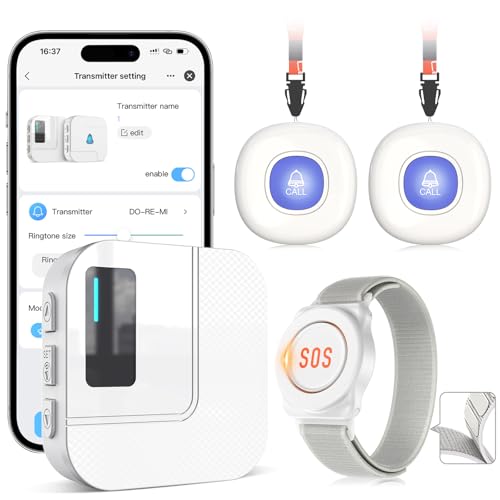
The CallToU Wi-Fi Wireless Caregiver Pager Call Button is an essential tool for elderly individuals and their caregivers, ensuring quick and effective communication in times of need. With a reliable range of 328ft, this device penetrates walls and doors, giving you peace of mind. It connects to your home Wi-Fi for global access and triggers loud alarms with flashing lights when pressed. You’ll receive instant app notifications, and you can share alerts with family members. Customize it with 20 ringtones and 5 volume levels, making it easy to differentiate between buttons. Battery-powered, it’s a practical solution for enhanced caregiving.
Best For: This product is best for elderly individuals, seniors, patients, and disabled individuals who require quick communication with caregivers.
Pros:
- Easy to use with a straightforward app for instant notifications.
- Customizable ringtones and volume levels allow for personalized alerts.
- Reliable range of 328ft ensures communication even through walls.
Cons:
- Requires a 2.4G Wi-Fi connection, limiting compatibility with some networks.
- Monthly fee for phone/text notifications adds ongoing costs.
- Battery-powered, which may require periodic battery replacement.
Caregiver Pager, Wireless Call Button for Seniors

For seniors living independently at home, the Caregiver Pager is an essential tool that guarantees immediate assistance with just the press of a button. This wireless call button features an SOS button and a receiver, ensuring you can call for help quickly. With 58 ringtones and adjustable volumes up to 120 dB, you can customize alerts to suit your needs. Its durable, waterproof design withstands various conditions, and it operates effectively within a 1500-foot range. Plus, with an 18-month warranty and a solid customer rating of 4.7 stars, you can trust this device to enhance safety and peace of mind.
Best For: The Caregiver Pager is best for seniors living independently at home who require immediate assistance in case of emergencies.
Pros:
- Durable and waterproof design, ensuring reliability in various conditions.
- Customizable alerts with 58 ringtones and adjustable volume levels up to 120 dB.
- Impressive range of 1500 feet, allowing for effective communication throughout the home.
Cons:
- Battery-powered, requiring periodic battery replacement.
- Limited to a single SOS button, which may not suffice for larger homes or multiple users.
- Dependency on the receiver being within range to function properly.
CallToU Caregiver Pager Wireless Call Button Alert System

Caregivers looking for an efficient way to stay connected with elderly or disabled individuals will find the CallToU Caregiver Pager an invaluable tool. With a wireless range of over 500 feet, this system guarantees you’re always within reach. The waterproof transmitter can be worn as a pendant or mounted securely, making it convenient for users. Choose from 55 ringtones at adjustable volumes up to 110 decibels, assuring you never miss an alert. Rated 4.6 out of 5 stars, it’s a reliable choice that comes with a 30-day return guarantee and 24-hour customer support for added peace of mind.
Best For: Caregivers and families of elderly, disabled, or patients needing reliable communication and assistance.
Pros:
- Wireless range of over 500 feet ensures caregivers can stay connected without being in close proximity.
- Adjustable volume with 55 ringtone options allows customization to suit different environments and preferences.
- Waterproof and durable design makes it suitable for various settings, providing peace of mind for users.
Cons:
- Requires a 12V battery that is not included, which may be inconvenient for some users.
- Limited range in obstructed areas could affect performance depending on the environment.
- May not be suitable for users who prefer more advanced technology or features beyond basic alert systems.
CallToU Wi-Fi Wireless Caregiver Pager Call Button for Elderly
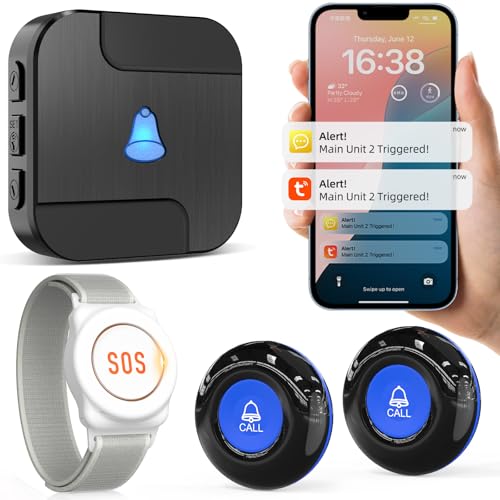
Designed specifically for elderly individuals living at home, the CallToU Wi-Fi Wireless Caregiver Pager Call Button offers a reliable way to guarantee safety and quick assistance. With a range of 328ft, it penetrates walls and connects easily to your home Wi-Fi. When pressed, the button triggers a loud alarm and flashing lights, instantly notifying you through a free app. You can even set up optional phone or text alerts for a small monthly fee. The Tuya app enables family sharing, ensuring that multiple members receive alerts. Plus, you can customize ringtones and button names for easy identification.
Best For: The CallToU Wi-Fi Wireless Caregiver Pager Call Button is best for elderly individuals living at home who require quick access to assistance.
Pros:
- Wide range: Operates effectively within 328ft, penetrating walls and doors for reliable connectivity.
- Family sharing: The Tuya app allows multiple family members to receive alerts simultaneously, enhancing support.
- Customizable features: Offers 20 ringtones and customizable button names for easy identification.
Cons:
- Limited Wi-Fi compatibility: Only supports 2.4G Wi-Fi, which may not be suitable for all home networks.
- Monthly fee for additional notifications: Optional phone or text message alerts come at an additional cost of $9.99/month.
- Potential learning curve: Users may need time to familiarize themselves with the app and its features.
CallToU Wireless Caregiver Pager Call Button Medical Alert System

The CallToU Wireless Caregiver Pager Call Button Medical Alert System stands out as an essential tool for seniors, patients, and individuals with disabilities. With two waterproof transmitters and three plugin receivers, help is just a button press away. You can move around freely while staying connected, thanks to its impressive 500 ft range. The portable call buttons can be worn around the neck or secured easily. Customize alerts with 55 ringing tones and five volume levels from 0db to 110db. Durable and waterproof, this system guarantees reliable performance, backed by 24-hour customer support for any assistance you might need.
Best For: Seniors, patients, and individuals with disabilities who need immediate assistance from caregivers.
Pros:
- Easy to use with portable call buttons and multiple receivers for mobility.
- Customizable alerts with 55 ringing tones and adjustable volume levels for personal preference.
- Waterproof and dustproof design ensures durability in various environments.
Cons:
- The range may be limited in areas with many walls or obstacles.
- Requires access to electrical outlets for the receivers, which may limit placement options.
- Initial setup may require assistance for some users who are not tech-savvy.
WiFi Caregiver Page Wireless Call Button System (1 Lanyard + 1 Wristband)

For those looking after elderly loved ones or individuals with mobility challenges, the WiFi Caregiver Page Wireless Call Button System stands out as an essential tool. This system includes a lanyard and a wristband, allowing users to call for help instantly. With no monthly fee, it connects to 2.4G Wi-Fi and offers a range of 328 feet, making it effective in various settings. You can customize alerts with unique names and ringtones, ensuring you know who needs assistance. Plus, its waterproof design keeps it safe in wet environments, helping prevent falls and enhancing peace of mind for caregivers and their families.
Best For: Caregivers looking after elderly individuals or those with mobility challenges who need an easy way to call for assistance.
Pros:
- Customizable alerts with unique names and 18 ringtone options help identify who needs help.
- Waterproof design and IP65 rating make it suitable for use in wet environments, reducing fall risk.
- No monthly fees and easy connectivity to 2.4G Wi-Fi ensure cost-effective and convenient use.
Cons:
- Limited to 2.4G Wi-Fi connectivity, which may not be compatible with all home networks.
- The operating range of 328 feet might be insufficient for larger properties or facilities.
- Requires the use of an app for alerts, which may not be user-friendly for all caregivers or family members.
Factors to Consider When Choosing Smart Communication Devices for Caregivers
When choosing smart communication devices for caregivers, you need to take into account several key factors. Think about the communication range, durability, and how easy the device is to use. Don’t forget to evaluate alert customization options and the power source, as these can greatly impact your caregiving experience.
Communication Range Capabilities
Choosing smart communication devices for caregivers involves understanding the importance of communication range capabilities, especially since alerts from patients or seniors need to be received throughout various locations in a home or facility. Look for devices that offer a range exceeding 500 feet in open areas, ensuring you’re connected even when moving around. Many systems use 433MHz technology, which can penetrate walls and doors, allowing alerts to come through in different rooms. Remember that environmental factors, like walls and furniture, can affect range, so consider these when choosing. Also, opt for devices with adjustable volume levels and various ringtones to enhance alert clarity, especially when you’re at a distance. This way, you can respond quickly to those in need.
Device Durability and Resistance
Considering the demanding environments caregivers often work in, device durability and resistance are fundamental factors to guarantee reliable communication. Look for devices with a strong IP rating, like IP65, which indicates resistance to dust and water exposure. Choose materials that can handle spills and high humidity, especially in kitchens and bathrooms. It’s also essential that the device operates effectively across a range of temperatures, ideally from -4°F to 140°F, to avoid malfunctions in extreme conditions. Additionally, select devices designed to resist physical impacts and drops to enhance longevity. Finally, evaluate the warranty and customer service support, as robust service options are crucial for addressing maintenance and troubleshooting durability issues effectively.
User-Friendly Interface Design
How can a user-friendly interface transform the experience of caregivers? A well-designed interface makes it easy for you to navigate features without needing extensive training. Intuitive navigation allows quick access to essential functions, saving you time and stress. Customizable options let you personalize device names and alert tones, helping you identify alerts swiftly. Clear visual indicators, like flashing lights or color coding, enhance your ability to recognize the urgency of notifications at a glance. A mobile app that offers real-time notifications guarantees you’re connected, even when away from the main device. Plus, a robust support system with user manuals and 24/7 customer service boosts your confidence, making it more likely you’ll use the device effectively.
Alert Customization Options
Customizing alert options is essential for enhancing the effectiveness of smart communication devices for caregivers. Look for systems that offer a variety of customizable alert tones, ideally with up to 55 different ringtones to match your preferences. Adjustable volume levels are important too; some devices let you set volumes from 0dB to over 120dB, accommodating various hearing needs. The ability to assign unique names to each button or alert can streamline response during emergencies, making identification easier. Additionally, consider devices with multi-channel alerts that combine loud alarms with visual notifications like flashing lights, ensuring alerts are noticed in any environment. Finally, systems that allow app notifications to be shared with family members enhance coordination and response effectiveness.
Power Source and Battery
Choosing the right power source for smart communication devices can greatly impact their functionality and your ability to respond in critical moments. Some devices run on batteries, while others need a constant electrical supply, affecting where you can place them. Battery-operated devices usually come with specifications like battery type and estimated life, which are essential for uninterrupted operation during emergencies. Opt for devices with included or rechargeable batteries to save you the hassle of replacements. Also, consider power-efficient models, especially for battery-powered options, as low energy consumption enhances reliability. Features like low-battery alerts can keep you informed, ensuring that your devices are always ready when you need them most.
Installation and Setup Process
The installation and setup process for smart communication devices is often straightforward, allowing caregivers to quickly get their systems up and running. Many devices come pre-paired, minimizing installation time and effort. You’ll typically only need to connect to your home Wi-Fi network, which usually supports 2.4G frequencies for compatibility. Installation often involves plugging receivers into electrical outlets, making them portable and easy to relocate within your home. You can mount call buttons on walls, place them on tables, or wear them as pendants for easy access. Plus, detailed user manuals and 24-hour customer support are commonly provided, ensuring you have assistance for any setup questions or challenges you might face.
App Connectivity and Features
After getting your smart communication devices set up, it’s important to contemplate how they connect to apps and the features they offer. Look for devices that support 2.4G Wi-Fi, guaranteeing global app access. Instant notifications upon button activation can dramatically enhance responsiveness during emergencies. Customization is key; choose systems that let you assign unique names to buttons and select ringtones, helping you quickly identify alerts. Ascertain the app allows sharing notifications with multiple family members or caregivers for collaborative care. Additionally, check if the device provides lifetime updates and offers alternative alert options, like SMS or email notifications, to keep communication effective over time. These features make a significant difference in caregiving.