A fall detection wearable can help summon assistance when a senior cannot reach a phone or press an emergency button. The right choice depends on where they spend their time, who should receive alerts, and whether they will wear the device consistently.
These 10 options include monitored medical alerts, GPS-enabled watches, and family-alert wristbands. Here is what to check before choosing one for yourself or someone you care for.
Best 10 Wearable Fall Detection Devices for Seniors Picks for 2026
Best for Caregiver Updates
Safety+ 4G Medical Alert System

- 24/7 monitoring with automatic fall alerts
- GPS and activity updates in caregiver app
- $40/month after the included first month
Best For: Families wanting monitored help and caregiver visibility
Best for Established Monitoring
ADT On-The-Go Mobile Medical Alert

- Fall detection pendant and one-button SOS
- U.S.-based professional monitoring
- Monthly plan and AT&T coverage required
Best For: Seniors who prefer ADT-monitored mobile assistance
Best for Location Boundaries
Fall Detection GPS Smart Watch

- Fall alerts sent to preset contacts
- GPS tracking with geo-fence alerts
- Included data-only SIM cannot make voice calls
Best For: Caregivers prioritizing location and boundary notifications
Best for Simple Pendant Wear
Smart Med Alert Cellular Necklace

- Automatic fall alerts with a qualifying plan
- Two-way voice with live monitoring
- Subscription and cellular coverage required
Best For: Seniors preferring a monitored necklace without a phone
Best for Video Check-Ins
4G Fall Detection Watch with GPS

- Automatic fall alerts to preset contacts
- GPS tracking and geofence alerts
- Video calls; voice calls need a separate SIM
Best For: Families wanting fall alerts and video check-ins
Best for Live Monitoring
Family First Alert Mini Pendant

- SOS connects to 24/7 live operators
- AT&T and Verizon cellular coverage
- Fall detection costs $4.99 extra monthly
Best For: Seniors who prefer live emergency monitoring
Best for Family-Direct Alerts
Seculife Medical Alert Smartband

- Fall and SOS calls go to family contacts
- GPS tracking and geofence alerts
- Plans start at $25 monthly
Best For: Families who can respond directly to alerts
Best Screen-Free Option

- Direct alerts to preset contacts
- GPS tracking and geofencing
- $25 monthly subscription
Best For: Families who prefer simple controls and direct alerts
Best for Video Contact
Fall Detection Watch for Seniors

- Fall alerts and GPS geofencing
- Video calls require a voice-enabled SIM
- Includes one year of data service
Best For: Families seeking a touchscreen watch with video-call capability
Best for Activity Features
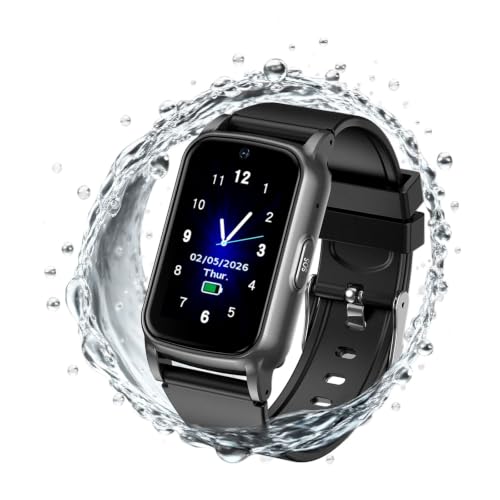
- Fall alerts and GPS geofencing
- Step, sleep, and heart-rate tracking
- Voice calls need a separate SIM
Best For: Wearers who want activity features with location alerts
Best for Caregiver Updates – Safety+ 4G Medical Alert System
Among wearable fall detection devices for seniors, Safety+ combines automatic fall alerts with 24/7 monitoring, GPS location and a caregiver app. It works without the wearer carrying a smartphone, and the included lanyard and belt clip offer two ways to wear it.
Best For: Families who want monitored help and app-based caregiver updates.
Pros:
- Fall detection and two-way communication with monitoring operators are included.
- Caregiver app shows location, activity, battery status and emergency notifications.
- Up to six days of battery life; water-resistant for showers and rain.
Cons:
- Requires activation by phone before use.
- Service costs $40 per month after the included first month.
Safety+ is a practical choice when several caregivers want visibility, but the ongoing monitoring cost belongs in the budget.
Best for Established Monitoring – ADT On-The-Go Mobile Medical Alert
Shoppers comparing wearable fall detection devices for seniors may appreciate this ADT system’s combination of a fall detection pendant, mobile SOS access and U.S.-based professional monitoring. Its cellular connection uses the nationwide AT&T network, so coverage matters where it will be worn.
Best For: Seniors who want an on-the-go alert system backed by ADT monitoring.
Pros:
- One-button access to professional monitoring.
- Agents provide emergency contacts with updates during an incident.
- GPS capability and a stated average battery life of 40 hours.
Cons:
- Phone activation and a monthly monitoring plan are required.
- Cellular service depends on AT&T network availability.
ADT’s appeal is its monitored response and caregiver communication. Confirm the monitoring plan and local coverage before choosing it.
Best for Location Boundaries – Fall Detection GPS Smart Watch
This watch stands out among wearable fall detection devices for seniors by pairing fall alerts with GPS tracking and geo-fence notifications. Its large touchscreen also offers step counting and health-tracking features for families who prefer a watch to a pendant.
Best For: Caregivers who want location-boundary alerts alongside fall notifications.
Pros:
- Automatically sends fall alerts to preset emergency contacts.
- GPS tracking and geo-fencing can notify caregivers when the wearer leaves a set zone.
- Includes one year of data service with its pre-installed data-only SIM.
Cons:
- The included SIM does not support voice calls; calling requires a separate voice-enabled SIM.
- Alerts go to contacts rather than a stated professional monitoring center.
Choose this for its location features and watch format, while planning for a different SIM if two-way calling is important.
Best for Simple Pendant Wear – Smart Med Alert Cellular Necklace
For buyers who favor a necklace among wearable fall detection devices for seniors, Smart Med Alert offers automatic fall alerts, GPS location and two-way voice contact with a monitoring professional. The optional app can show location, battery level and alarm notifications.
Best For: Seniors who want a cellular pendant without needing a nearby smartphone.
Pros:
- An uncanceled possible-fall alert can reach the monitoring center without a button press.
- Built-in speaker and microphone allow conversation with a live professional.
- Optional app provides location, battery status and SOS or fall notifications.
Cons:
- Activation, cellular coverage and an active monitoring subscription are required; fall detection needs a qualifying plan.
- Water-resistant, not waterproof; do not submerge.
This is a straightforward monitored pendant option, but check plan eligibility and coverage. As with other fall sensors, it may not detect every fall.
Best for Video Check-Ins – 4G Fall Detection Watch with GPS
Among wearable fall detection devices for seniors, this watch stands out for combining automatic fall alerts with GPS tracking, geofencing, and video calling. Its large touchscreen may suit families who want more ways to check in than an SOS button alone.
Best For: Families who want fall alerts, location updates, and face-to-face check-ins in one wrist-worn device.
Pros:
- Detects sudden falls and notifies preset emergency contacts.
- GPS tracking and geofence alerts help caregivers monitor wandering.
- Supports 4G video calling and includes a preinstalled data-only SIM with one year of data service.
Cons:
- The included data-only SIM does not support voice calls; those require a separate voice-enabled SIM.
- IP67 water resistance is intended for everyday exposure such as hand washing or rain, not unrestricted water use.
The key purchase check is connectivity: confirm the SIM arrangement meets your calling needs before relying on the watch for voice communication.
Best for Live Monitoring – Family First Alert Mini Pendant
If you prefer an operator-backed option among wearable fall detection devices for seniors, this compact pendant offers an SOS button connected to 24/7 monitoring. Automatic fall detection is available, but it is a paid add-on rather than part of the base plan.
Best For: Seniors who want a wearable button that connects to a live emergency operator at home or on the go.
Pros:
- Button presses connect to trained operators through the monitoring service.
- Uses 4G LTE on AT&T and Verizon networks where cellular service is available.
- Water-resistant pendant can be worn in the shower; a caregiver app and GPS location are listed features.
Cons:
- Requires activation and a $39.99 monthly monitoring subscription.
- Automatic fall detection costs an additional $4.99 per month.
- The seller recommends daily charging, despite listing up to five days per charge.
This is the more service-oriented choice of the three, but budget for both monthly charges if automatic fall alerts are essential.
Best for Family-Direct Alerts – Seculife Medical Alert Smartband
For shoppers comparing wearable fall detection devices for seniors without a call center, the Seculife smartband sends emergency calls to preselected contacts after a detected fall or a three-second SOS-button press. It also pairs location tools with two-way calling.
Best For: Families prepared to receive alerts directly and use an app to follow a loved one’s location.
Pros:
- Automatic fall detection and an SOS button call preselected emergency contacts.
- GPS tracking, geofence alerts, and location history support caregiver check-ins.
- Approved contacts can call the band and have it answer automatically without the wearer pressing a button.
Cons:
- Service starts at $25 per month.
- Alerts go to family contacts rather than a staffed emergency call center.
- The listed average battery life is one day, so regular charging matters.
Its hands-free answering may be especially useful when operating a phone is difficult. Make sure designated contacts can respond to alerts promptly.
Best Screen-Free Option – SecuLife SOS Wristband
Among wearable fall detection devices for seniors, the SecuLife SOS Wristband suits someone who wants a simple, screen-free alert button. A press or detected fall contacts preset family members directly rather than routing through a call center.
Best For: Families who want direct alerts, location tracking, and two-way calling without a touchscreen.
Pros:
- Automatic fall alerts and one-button SOS contact preset recipients.
- GPS tracking and geofencing help caregivers check location.
- Two-way calling and an IP67-rated design support everyday use.
Cons:
- Requires a $25 monthly subscription.
- Listed average battery life is one day, so charging needs attention.
- Direct-to-family alerts are not a substitute for a monitored call center.
This is the straightforward pick if relatives are ready to receive alerts themselves. Factor the subscription and daily charging into the decision.
Best for Video Contact – Fall Detection Watch for Seniors
This touchscreen model adds video contact to the usual features of wearable fall detection devices for seniors. Its listed functions include automatic fall alerts to preset contacts, GPS tracking, geofencing, and activity and health readings.
Best For: Families who want a watch-style device with location tools and the option for video calls.
Pros:
- Fall detection and an SOS button provide two ways to trigger an alert.
- GPS location and geofencing can help caregivers follow a wearer’s movements.
- Large touchscreen, magnetic charging, and IP67 rating are practical daily-use features.
Cons:
- The included SIM has one year of data service but does not support voice calls; calling requires your own voice-enabled SIM.
- The touchscreen may be less appealing to someone who wants one-button simplicity.
The calling setup is the key detail to check before buying. Despite the no-monthly-fee title, the supplied notes only confirm one year of included data, not the cost of service afterward.
Best for Activity Features – GPS Fall Detection Watch
For shoppers comparing wearable fall detection devices for seniors, this watch pairs fall alerts and GPS location tools with a step counter, sleep tracking, and heart-rate readings. It uses a touchscreen rather than the minimal controls of a basic alert bracelet.
Best For: A wearer who wants location and fall-alert features alongside everyday activity tracking.
Pros:
- Automatic fall alerts and a separate SOS button can notify preset contacts.
- Real-time GPS and geofencing add location-based alerts.
- Step counting, sleep tracking, and heart-rate readings add daily-use features.
Cons:
- The preinstalled SIM provides data, not voice calling; calls need a separate voice-enabled SIM.
- One year of data service is included, but the notes do not specify later service costs.
- Health readings should not be treated as medical diagnoses.
This listing supplies the same core specifications as the other fall-detection watch here, so compare their current prices and SIM requirements rather than assuming a feature difference.
How We Picked the Best Wearable Fall Detection Devices for Seniors
We focused on practical differences among the 10 selected devices: automatic fall detection, an accessible SOS button, alert routing, location features, and wearable format. We also considered whether a device is designed for a monitoring center or for direct family notifications. Product descriptions do not establish real-world detection accuracy, so treat every fall alert as a backup to—not a replacement for—an easy-to-press help button.
Quick Comparison: Wearable Fall Detection Devices for Seniors
- Monitored medical alert pendant or mini device: A good starting point when the wearer needs a 24/7 response service rather than relying on relatives to notice an alert. Check the subscription and activation requirements.
- Family-alert wristband or smartband: Suits households with people who can receive and act on notifications. Confirm who gets alerts, how they arrive, and what happens if no one responds.
- GPS-enabled watch: Worth considering for someone who regularly leaves home and will use features such as location sharing or two-way calling. More features can mean more setup and charging.
Key Buying Factors for Wearable Fall Detection Devices for Seniors
Response Path and Coverage
Ask what happens after an automatic alert or button press. Does the device connect to a monitoring center, call designated contacts, or send an app notification? Cellular wearables need service where the wearer actually goes; check coverage, plan terms, and whether GPS location is included. A caregiver app is useful only if the right people can access it and keep notifications enabled.
Comfort, Controls, and Charging
The best device is one the senior will keep on. Compare a necklace with a wrist-worn design, then check weight, clasp or strap comfort, button size, and whether the speaker is easy to hear. Review the stated water-resistance rating before assuming it can be worn in the shower. Battery life and charging routine matter, especially for someone who may forget to recharge a smartwatch.
Fall Detection Limits and Total Cost
Automatic detection may miss some falls or trigger during ordinary movement. Confirm whether sensitivity can be adjusted and whether the wearer can cancel a false alarm. Compare the device price with activation fees, cellular service, monitoring, and any required app plan. Verify current terms before buying; similar-looking watches can have very different ongoing costs.
Who Should Buy Which Wearable Fall Detection Devices for Seniors?
Choose a monitored option if no family member can reliably respond at all hours. Choose a direct-to-family wristband if caregivers prefer to handle alerts themselves and have a clear backup contact. For an active senior who spends time away from home, prioritize mobile coverage, GPS, and two-way communication. For someone who dislikes complicated technology, favor a comfortable, simple device with a prominent SOS button over extra fitness features. Whichever type you choose, test the alert process with the wearer and caregivers during setup.