Choosing the right safety device can make a big difference for seniors who want independence and caregivers who want faster updates. The best options balance ease of use, dependable alerts, and simple setup.
This roundup of medical alert devices with caregiver notifications focuses on practical features like app alerts, fall detection, GPS, and monitoring plans so you can match the system to real-life needs.
Best 10 Medical Alert Devices with Caregiver Notifications Picks for 2026
Best for Wi-Fi Caregiver Alerts
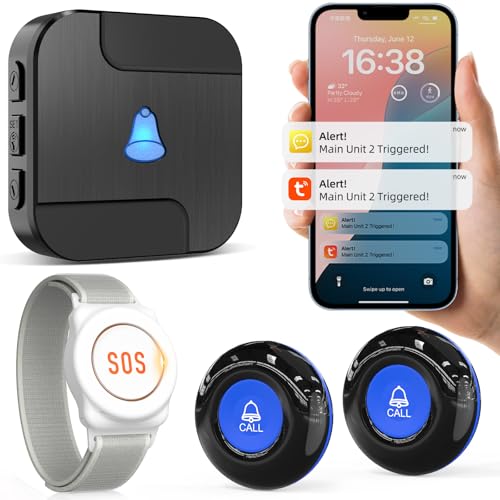
- App alerts with optional phone/text notifications.
- Family sharing can notify multiple caregivers at once.
- 433MHz button system with custom ringtones and names.
Best For: Households that want shared, app-connected caregiver alerts for home use.
Best No-Fee Choice
No Subscription Elderly Medical Alert SOS

- No monthly fees or contract required
- Waterproof wrist and necklace panic buttons
- 150-foot range with simple plug-and-play setup
Best For: Seniors or caregivers who want a one-time-purchase alert system for home use.
Best for Direct Family Alerts
SecuLife Medical Alert Pendant

- Direct-to-family alerts with no call center
- Auto fall detection, GPS, geofencing, and 2-way calling
- Waterproof IP67 pendant for everyday wear
Best For: Families who want caregiver notifications sent straight to loved ones with simple daily use.
Best for Simple Caregiver Coverage
CallToU Wireless Caregiver Pager System

- 2 call buttons and 2 plug-in receivers
- 500+ ft open-area range for home use
- Waterproof buttons with adjustable volume and tones
Best For: Families who want a simple, reliable caregiver alert system for home use.
Best for Discreet Wear

- Compact wearable with lanyard or belt-clip options
- 24/7 monitoring with GPS and two-way voice support
- Optional fall detection for added peace of mind
Best For: Seniors who want a discreet, everyday medical alert device with GPS and live operator help.
Best for Caregiver Alerts
PILSAMAS WiFi Caregiver Pager Smart Call System

- App alerts show who needs help and where
- No monthly fee for core notifications
- Waterproof buttons work well in bathrooms
Best For: Families and care facilities that want a simple, no-subscription alert system with caregiver notifications.
Best for No Monthly Fee
Life Alert Wi‑Fi Caregiver Pager System

- No subscription or monthly monitoring fee
- App push alerts plus audible receiver
- Includes necklace and wrist button options
Best For: Seniors at home who want a simple alert system with caregiver notifications and no ongoing fees.
Best with Caregiver App
Safety+ 4G Medical Alert System

- 24/7 monitoring with fall detection and GPS location
- Caregiver app provides alerts, location, activity, and battery info
- No smartphone required; includes first month of service
Best For: Seniors and adults who want monitored emergency support plus a caregiver app for location and alerts.
Best Simple Pick
NOMO Smart Care Medical Alert System
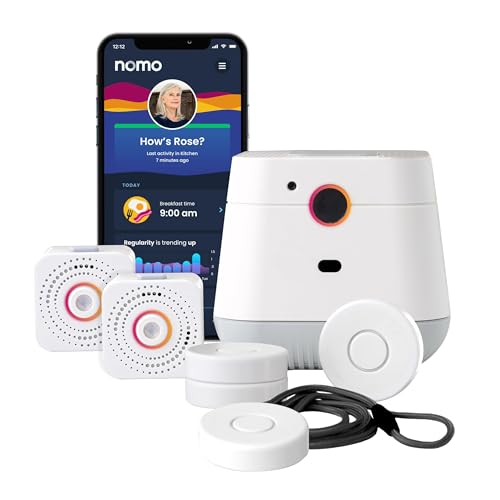
- Instant caregiver alerts via the Care Circle
- Camera-free, privacy-focused in-home monitoring
- Includes two-way voice and fall detection
Best For: Families who want a privacy-focused home alert system with caregiver notifications and emergency response.
Best for Wi-Fi Caregiver Alerts – CallToU Wi-Fi Caregiver Pager
If you want one of the more flexible medical alert devices with caregiver notifications, this CallToU system is built for home use with both local alarm output and app-based alerts. It combines a wireless call button, Wi-Fi connectivity, and optional family sharing so help requests can reach more than one person fast.
Best For: Seniors, patients, or disabled users at home who need app alerts plus shared caregiver notifications.
Pros:
- App notification support with optional phone or text alerts for added coverage.
- Family sharing through the Tuya app lets multiple caregivers receive the same alarm.
- 433MHz wireless button offers a claimed 328 ft range and wall penetration for home coverage.
- Custom ringtones and button names make it easier to identify who needs help.
Cons:
- Only supports 2.4G Wi-Fi, so it will not work on 5G-only networks.
- Advanced notification features may require a paid subscription for SMS/phone alerts.
- More of a home caregiver alert system than a medical-grade emergency device.
This is a practical pick if you want medical alert devices with caregiver notifications that go beyond a single loud pager and into shared, app-connected monitoring. It fits households that want easier coordination between family members without moving to a full professional monitoring service.
Best No-Fee Choice – No Subscription Elderly Medical Alert SOS
If you want medical alert devices with caregiver notifications without adding another bill, this no-subscription system is a straightforward option. It uses a landline-based setup and lets you program emergency numbers yourself, making it a practical fit for buyers who want simple, at-home protection.
Best For: Seniors or caregivers looking for a one-time-purchase alert system with customizable emergency calling and easy setup.
Pros:
- No monthly fees, contracts, or subscription required
- Waterproof wrist and necklace buttons for bath and shower use
- Simple plug-and-play setup with up to 150 feet of range
Cons:
- Requires a landline unless you add an optional cell phone adaptor
- Not a modern app-based caregiver notification system
- Emergency calling depends on the numbers you program correctly
For shoppers comparing medical alert devices with caregiver notifications, this model stands out for keeping costs low while still offering customizable emergency calling and wide in-home coverage. It is best for someone who wants a traditional, easy-to-use alarm system more than app-based monitoring.
Best for Direct Family Alerts – SecuLife Medical Alert Pendant
If you want medical alert devices with caregiver notifications that skip the call center and notify family directly, this SecuLife pendant is built around that model. It adds auto fall detection, GPS tracking, two-way calling, and waterproof wearability, making it a practical choice for seniors who need everyday monitoring with simple emergency communication.
Best For: Seniors or caregivers who want direct-to-family emergency alerts, location tracking, and an easy wearable that can be used daily.
Pros:
- Alerts go straight to preselected family contacts, with no call center in between
- Includes auto fall detection, GPS tracking, geofencing, and 2-way calling
- Waterproof IP67 design supports 24/7 wear, including showers and rain
- Simple pendant format is senior-friendly and easy to understand
Cons:
- Requires a $20 monthly subscription to use the service
- Battery life is good, but not long enough to forget about charging entirely
- Best fit for families who are comfortable managing alerts themselves
For buyers comparing medical alert devices with caregiver notifications, this SecuLife pendant stands out because it prioritizes direct family communication over a traditional monitoring center. That makes it especially appealing if your main goal is fast, simple alerts to loved ones plus GPS-based peace of mind.
Best for Simple Caregiver Coverage – CallToU Wireless Caregiver Pager System
If you want medical alert devices with caregiver notifications that are easy to set up and work well around the home, this CallToU pager system is a practical pick. It includes two call buttons and two plug-in receivers, so caregivers can stay reachable across multiple rooms without relying on a phone app or subscription.
Best For: Homes that need a straightforward, low-maintenance alert system for elderly family members, patients, or anyone who needs quick caregiver contact.
Pros:
- Two transmitters and two receivers help cover more than one room or caregiver
- 500+ ft open-area range and plug-in receivers make it easy to move around the house
- 55 ringtones and adjustable volume let you tailor alerts to the environment
- Waterproof, dustproof buttons and receivers add everyday durability
Cons:
- Requires an outlet for the receivers, so placement depends on available plugs
- No app-based notifications or advanced smart-home features
- Open-area range may be reduced by walls and interference
This is a solid choice if you want medical alert devices with caregiver notifications that prioritize simplicity, room-to-room coverage, and dependable push-button calling over tech-heavy features.
Best for Discreet Wear – Medical Guardian MGMini
If you want one of the more compact medical alert devices with caregiver notifications, the Medical Guardian MGMini is built for low-profile everyday wear without giving up core safety features. It combines 24/7 monitoring, GPS tracking, and cellular coverage across AT&T and Verizon networks, so help is available at home or on the move.
Best For: Seniors who want a small, discreet alert device with live operator support, GPS location updates, and optional fall detection.
Pros:
- Small, wearable design with lanyard or belt-clip options
- Two-way voice connection to a U.S.-based operator in about 10 seconds
- GPS tracking and 4G LTE coverage for use at home or outside
- Optional fall detection add-on for extra protection
Cons:
- Requires a paid subscription after the first free month
- Fall detection costs extra
- Activation is required before the device can be used
Overall, the MGMini is a strong fit if you want medical alert devices with caregiver notifications in a compact form factor that still prioritizes fast response, location awareness, and simple daily wear.
Best for Caregiver Alerts – PILSAMAS WiFi Caregiver Pager Smart Call System
If you want medical alert devices with caregiver notifications that make it easy to see who needs help and where, this PILSAMAS system is built around fast app alerts, caller ID-style identification, and no monthly fee. It pairs a Wi‑Fi hub with wearable and fixed call buttons, so it works well for home care setups that need simple monitoring without a subscription.
Best For: Families, caregivers, and senior care facilities that want a no-fee alert system with app-based notifications and room-level identification.
Pros:
- App alerts identify the device and location quickly, helping caregivers respond faster.
- No monthly fee, with free app notifications and shared alerts for multiple family members.
- IP65 waterproof buttons and wristband are suitable for bathrooms, showers, and high-humidity areas.
- Pre-paired setup and multiple mounting/wear options make it flexible for home or facility use.
Cons:
- The hub requires 2.4GHz Wi‑Fi, not 5GHz.
- SMS, call, and email alerts need an optional plan.
Overall, this is a practical pick for shoppers comparing medical alert devices with caregiver notifications because it emphasizes clear location-based alerts, flexible placement, and subscription-free core app monitoring.
Best for Fall Alerts – Seculife Cellular Medical Alert Smartwatch
If you want a watch-style option among medical alert devices with caregiver notifications, the Seculife Cellular Medical Alert Smartwatch blends automatic fall detection, GPS tracking, and two-way calling into one wearable. It’s designed for seniors who want a simple daily watch with emergency tools built in, plus caregiver-facing location and alert features.
Best For: Seniors who need an easy-to-wear alert watch with automatic fall detection, GPS tracking, and emergency calling.
Pros:
- Automatic fall detection can send SOS alerts without pressing a button
- GPS tracking and location history help caregivers monitor whereabouts
- Two-way calling and auto-answer for approved contacts add convenience
- Includes heart rate, blood pressure, blood oxygen, and step tracking
Cons:
- Requires a $25 monthly subscription
- Health readings should be treated as wellness data, not a medical diagnosis
- May be more feature-heavy than users who only want a basic emergency button
Overall, this is a strong pick if you want medical alert devices with caregiver notifications in a smartwatch format rather than a traditional pendant. The mix of automatic alerts, GPS, and basic health tracking makes it especially appealing for families who want more visibility without making the device feel clinical.
Best for No Monthly Fee – Life Alert Wi‑Fi Caregiver Pager System
If you want one of the simplest medical alert devices with caregiver notifications, this Wi‑Fi pager system keeps the setup straightforward: press the button, trigger the receiver, and send app alerts to connected family members. It’s a practical choice for homes that want emergency calling without paying a monthly monitoring fee.
Best For: Seniors at home who need a no-subscription alert button with both local receiver sound and caregiver app notifications.
Pros:
- No monthly fee or subscription required
- Sends app push notifications over 2.4GHz Wi‑Fi
- Includes both necklace and wrist-worn alert buttons
- Works well for common living areas like bedroom, bathroom, and kitchen
Cons:
- Requires 2.4GHz Wi‑Fi for app notifications
- Not a full professional monitoring service
- Limited to nearby caregiver response rather than emergency dispatch
This is a budget-friendly pick for families who want medical alert devices with caregiver notifications but prefer a one-time purchase over an ongoing plan. The combination of a loud receiver, wearable buttons, and app alerts makes it a solid fit for day-to-day senior safety at home.
Best with Caregiver App – Safety+ 4G Medical Alert System
This Safety+ system is a practical pick for shoppers comparing medical alert devices with caregiver notifications because it combines fall detection, GPS location, and 24/7 monitoring with app-based updates for family members. It works well for everyday wear at home or on the go, especially if you want a simple setup without needing a smartphone.
Best For: Seniors and adults who want monitored emergency support plus a caregiver app for location, activity, and alert updates.
Pros:
- Includes the first month of service, with 24/7 monitoring, fall detection, GPS, and app access
- Caregiver mobile app can send push alerts and share activity, battery, and location info
- Water-resistant design and up to 6 days of battery life suit daily wear
- No smartphone required for activation or use
Cons:
- Requires an ongoing monthly subscription after the included first month
- Some features depend on cellular coverage and app setup by caregivers
- Longer-term costs may be high for buyers who only need basic emergency calling
Overall, this is a strong option if you want medical alert devices with caregiver notifications that go beyond a simple help button. The GPS, fall detection, and Care Circle features make it especially useful for families who want visibility and fast emergency response.
Best Simple Pick – NOMO Smart Care Medical Alert System
NOMO Smart Care is a strong fit if you want medical alert devices with caregiver notifications built around in-home fall detection, app-based alerts, and simple WiFi setup. It uses a camera-free design for privacy, includes two-way voice communication, and sends updates to a trusted Care Circle when a fall or unusual movement is detected.
Best For: Seniors aging in place and families who want a privacy-focused, in-home alert system with caregiver notifications and emergency response.
Pros:
- Instant caregiver alerts through the Nomo app and Care Circle
- Camera-free, privacy-first design with WiFi monitoring
- Two-way voice communication for emergency situations
- Includes a 60-day trial of 24/7 monitoring with RapidSOS
Cons:
- Requires home WiFi for hub and satellite connectivity
- Ongoing monitoring costs $19.99 per month after the trial
- Primarily designed for in-home use, not all-day portability
For buyers comparing medical alert devices with caregiver notifications, NOMO stands out for blending fall detection, flexible app alerts, and a simple plug-and-play setup. It is especially appealing if you want a modern home-based system without a landline or camera.
How We Picked These Medical Alert Devices with Caregiver Notifications
We focused on devices that make it easier for family members, neighbors, or professional monitoring teams to respond quickly after an emergency. Priority went to products with clear alert pathways, straightforward activation, and features that fit different living situations.
We also compared the type of notification system, whether the device works at home or on the go, and how much ongoing cost may be involved. That means options here include app-based systems, no-subscription models, monitored services, and wearable devices with GPS or fall detection.
Quick Comparison
Some models are best for in-home use, especially button-based pager systems that send alerts to a caregiver nearby. Others are built for broader protection with cellular connectivity, GPS, and 24/7 monitoring for seniors who leave home frequently or live alone.
If you want the simplest setup, look for a device with a direct caregiver app alert and minimal monthly cost. If you want the widest safety net, choose a monitored wearable with automatic fall detection and location tracking.
Key Buying Factors for Medical Alert Devices with Caregiver Notifications
Notification Method
Check how alerts are delivered: phone app, text message, receiver base station, or professional call center. The best choice depends on who needs to be notified and how quickly they can respond.
Connectivity and Range
Wi-Fi systems work well in the home, while cellular models are better for people who travel or spend time outdoors. If the user may move around a large property or multiple rooms, verify range and signal reliability.
Fall Detection and GPS
Automatic fall detection can help when the wearer cannot press a button. GPS location tracking is especially useful for seniors with cognitive decline, active lifestyles, or caregivers who need to confirm where an alert happened.
Comfort, Charging, and Ease of Use
A device should be easy to wear all day and simple to charge. Large buttons, clear indicators, and a lightweight design can improve compliance, especially for older adults with vision or dexterity issues.
Ongoing Costs
Some Medical Alert Devices with Caregiver Notifications have no monthly fee, while others require monitoring or app services. Compare the total cost over time, not just the upfront price.
Who Should Buy Which Medical Alert Devices with Caregiver Notifications?
Choose a no-fee in-home alert system if the priority is affordable help for day-to-day living. Pick a Wi-Fi caregiver pager if family members need instant alerts inside the home or across nearby rooms.
Choose a monitored cellular pendant or smartwatch if the user wants protection beyond the house, especially with fall detection and GPS. For seniors who want the most complete oversight, professional monitoring plus caregiver app notifications offers the strongest coverage.
For most families, the best option is the one the senior will actually wear or use consistently. That usually means a device with simple controls, dependable alerts, and the least friction in daily life.