Wireless call buttons can make it much easier for disabled adults to request help quickly, whether at home, in a care room, or in a small facility. The best systems balance range, simplicity, and dependable alerts.
In this roundup, we focus on practical options that are easy to use, easy to place, and built to support everyday caregiver communication.
Best 10 Wireless Call Buttons for Disabled Adults Picks for 2026
Best for Wide-Range Home Use
FullHouse Wireless Caregiver Pager

- Long-range pager system with up to 1000 feet of open-air coverage
- 5 volume levels, LED flash, and 52 melody options
- Water-resistant button works well for bathrooms and other splash-prone spots
Best For: Disabled adults, seniors, or patients who need a simple home call button system.
Best for Multi-Room Coverage
Wireless Call Buttons for Nurse Call System (5-Pack)

- 5-button pack for covering multiple areas
- Wall, adhesive, screw, and lanyard mounting options
- Includes batteries and installation accessories
Best For: Care settings already using the compatible SYNLETT monitoring unit and needing several alert points.
Best for App-Based Alerts
Daytech Wi-Fi Caregiver Call Button
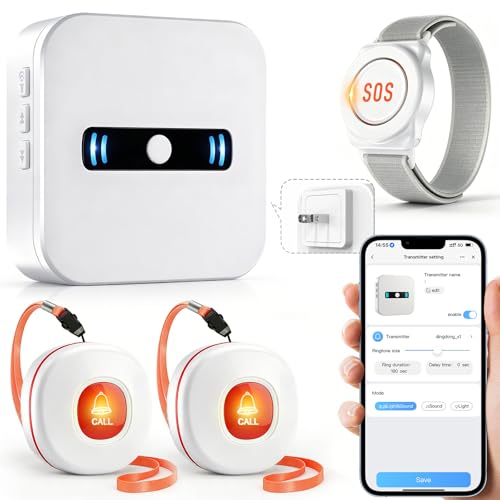
- Wi-Fi app alerts for remote caregiver notifications
- Includes 2 call buttons plus 1 SOS alert watch
- Custom ringtones and shared alerts for multiple users
Best For: Families needing app-based alerts and a wearable SOS option for a disabled adult or patient.
Best for Existing CallToU Systems

- Works with compatible CallToU receivers
- Waterproof button for caregiving use
- Long-range wireless alert button
Best For: People who already own a compatible CallToU receiver and need an extra help button.
Best for Simple SOS Alerts
Caregiver Pager Wireless Call Buttons

- 2 wireless call buttons with a portable pager
- Choose loud chime or continuous alarm alerts
- Flexible wear, wall-mount, or bedside placement
Best For: Seniors, disabled adults, and caregivers who need a simple home SOS alert system.
Best for Large Facilities
CallToU Wireless Caregiver Call Bell System

- Voice-announces call numbers for clearer response
- Expandable up to 1000 buttons for multi-user setups
- Up to 1000 ft range in open areas
Best For: Caregivers and facility managers who need a long-range, expandable alert system.
Best for Simple 1-Button Calling

- One-button, one-receiver design for easy daily use
- 500+ ft open-area range for flexible room coverage
- Waterproof and dustproof parts suit bathrooms and outdoor use
Best For: A disabled adult who needs a simple, reliable alert button for home caregiving.
Best for 24/7 Coverage
CallToU Wireless Caregiver Pager

- Dual-receiver setup covers rooms and mobile caregiving
- Vibration, flash, and 110dB sound improve alerting
- Waterproof SOS buttons suit bathrooms and bedside use
Best For: Disabled adults and seniors who need a simple, no-fee home alert system with portable caregiver coverage.
Best for Multi-Room Care Alerts
Wireless Emergency Call Button System

- 500 ft range works well in multi-room homes and care spaces.
- 38 ringtones, 5 volume levels, and LED display improve alert clarity.
- 10 waterproof buttons add flexibility for different users or rooms.
Best For: Caregivers needing an easy-to-expand alert system for disabled adults or elderly family members.
Best Simple Pick
CallToU Wireless Caregiver Pager
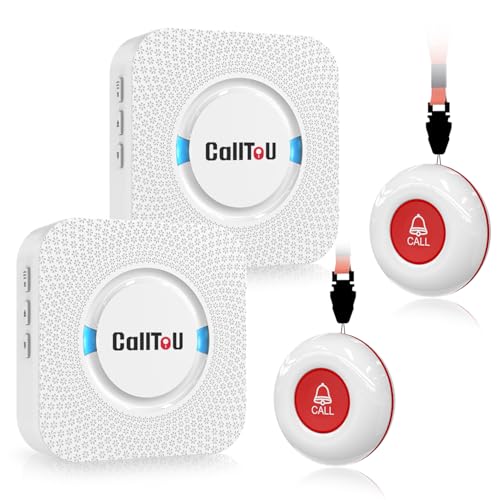
- 2 call buttons and 2 plug-in receivers
- 500+ ft range in open areas
- 55 tones with adjustable volume
Best For: Families who want simple help alerts across multiple rooms.
Best for Wide-Range Home Use – FullHouse Wireless Caregiver Pager
If you’re comparing wireless call buttons for disabled adults, this FullHouse caregiver pager is a practical home-alert option with a long range, simple setup, and no monthly fees. It gives the user an easy way to request help while letting caregivers move around the house without losing track of an alert.
Best For: Disabled adults, seniors, or patients who need a straightforward call-for-help system for home bathrooms, bedrooms, or care settings.
Pros:
- Up to 1000 feet in open air, with useful coverage for most homes
- 5 volume levels plus silent LED-flash mode for flexible alerting
- Water-resistant call button can be used in splash-prone areas like the bathroom
- 52 melody options make it easier to tailor the alert to the room or user
Cons:
- Not fully waterproof, so the button must be removed before bathing or showering
- Range drops when walls or barriers are between the transmitter and receiver
- Basic pager-style design may not suit buyers wanting app-based monitoring
For households that want a simple, low-maintenance alert system, this is a strong fit among wireless call buttons for disabled adults. It focuses on dependable room-to-room communication rather than extras, which makes it easy to use for everyday help requests.
Best for Multi-Room Coverage – Wireless Call Buttons for Nurse Call System (5-Pack)
If you need wireless call buttons for disabled adults in a care setting, this 5-pack is a practical option for building out multiple alert points across a room, bathroom, or front desk area. Each button is designed to pair with the SYNLETT Q034G-F007 central monitor, making it a focused add-on for users already in that system.
Best For: Care facilities, clinics, or households that want several mounted or wearable call buttons for different locations.
Pros:
- Comes with 5 buttons, so you can cover multiple rooms or stations at once.
- Flexible mounting options include wall brackets, adhesive, screws, and lanyards.
- Includes batteries and accessories, which helps simplify setup out of the box.
Cons:
- Only works with the SYNLETT Q034G-F007 monitoring unit.
- Requires pairing/programming before use.
- Not a standalone emergency call solution.
For buyers already using the compatible SYNLETT system, these wireless call buttons for disabled adults offer a versatile way to add alert points where they are needed most. The value here is in coverage and placement flexibility rather than universal compatibility.
Best for App-Based Alerts – Daytech Wi-Fi Caregiver Call Button
If you want one of the more flexible wireless call buttons for disabled adults, this Daytech Wi-Fi system adds app-based alerts, a loud receiver, and shared notifications so caregivers can stay informed at home or away.
Best For: Families who want Wi-Fi alerts, shared phone notifications, and a wearable SOS option for a disabled adult or patient.
Pros:
- Wi-Fi app alerts can reach your phone when the button or watch is pressed.
- Shared notifications help multiple caregivers stay in the loop.
- Custom ringtones and 5 volume levels make calls easier to identify.
- Includes both two wireless call buttons and an SOS alert watch.
Cons:
- The receiver must stay plugged into an outlet.
- Smartphone/app setup adds complexity versus a basic push-button pager.
- Some advanced alerts may depend on internet or notification settings.
Overall, this is a practical pick if you want wireless call buttons for disabled adults with extra caregiver coverage beyond a simple bedside alarm. The Wi-Fi app features make it more useful for shared homes or family members who need remote updates.
Best for Existing CallToU Systems – CallToU Wireless Call Button
If you already have a compatible CallToU receiver, this wireless call button is a simple add-on for creating wireless call buttons for disabled adults, seniors, or patients who need a quick way to request help. It’s designed for paired use, so it works best as part of an existing CallToU paging setup rather than as a standalone unit.
Best For: Homes, care rooms, or small businesses that already use CallToU receivers and want an extra waterproof call button.
Pros:
- Wide compatibility with multiple CallToU receivers
- Waterproof button design for everyday use
- Long operating range for room-to-room calling
- Useful for caregiver, patient, or service-alert setups
Cons:
- Requires a compatible receiver to function
- Not a complete plug-and-play system on its own
- Setup depends on pairing with the right CallToU model
For buyers shopping wireless call buttons for disabled adults, this is a practical expansion piece if you already own the matching receiver. It’s less appealing as a first-time purchase, but it can be a strong value when you need to add another help button to an existing alert system.
Best for Simple SOS Alerts – Caregiver Pager Wireless Call Buttons
If you need a straightforward way to add peace of mind at home, this caregiver pager is a practical option among wireless call buttons for disabled adults. It pairs two call buttons with a portable pager, making it easy for a person to request help while the caregiver stays in another room or handles other tasks.
Best For: Seniors, disabled adults, and home caregivers who want a simple SOS alert system with flexible placement.
Pros:
- Includes 2 wireless call buttons plus 1 portable pager for multi-room coverage
- Easy SOS-style operation with selectable ding-dong chime or loud alarm
- Flexible mounting and wearing options, including wall brackets and lanyard use
- Up to 500 feet range in open areas for home or small care settings
Cons:
- Range can be reduced by walls and interference in real homes
- More basic than advanced nurse-call systems with extra monitoring features
- Best suited to simple alerting, not two-way communication
For families comparing wireless call buttons for disabled adults, this model stands out for its simple setup and flexible alert placement rather than fancy extras. It is a solid fit when the priority is fast, reliable notification in a home caregiving environment.
Best for Large Facilities – CallToU Wireless Caregiver Call Bell System
If you need wireless call buttons for disabled adults in a home, clinic, or care setting, this CallToU system is built for fast alerts and easy room identification. The display receiver announces the call number, and the repeater alert option can help ensure requests are noticed without requiring repeated presses.
Best For: Caregivers who need a long-range, expandable call system for disabled adults, seniors, or patients across larger homes and facilities.
Pros:
- Voice announces the call number for quicker response and identification
- Expandable up to 1000 buttons, making it scalable for bigger operations
- Long-range signal works well in larger homes and facility layouts
- Buttons can be installed with stickers or worn around the neck
Cons:
- More features than a basic single-room call bell may need a little setup
- Best suited to organized care environments rather than ultra-minimal use
This is a strong pick if you want wireless call buttons for disabled adults that are simple to deploy but still capable of covering multiple rooms or users. Its expandable design and voice alerts make it especially practical for busy caregiving environments where clarity and range matter.
Best for Simple 1-Button Calling – CallToU Caregiver Pager
If you want an easy, no-fuss alert system, this CallToU set is a practical pick among wireless call buttons for disabled adults. It gives one caregiver and one user a straightforward way to request help quickly, with a plug-in receiver and a wearable or mountable button.
Best For: A single-room or small-home setup where one disabled adult needs fast, reliable access to a caregiver.
Pros:
- Simple 1-button, 1-receiver setup keeps use easy for daily care.
- 500+ ft open-area range helps cover bedrooms, kitchens, and living spaces.
- Waterproof, dustproof button and receiver add peace of mind in bathrooms or outdoors.
- 55 tones and adjustable volume make it easier to tailor alerts to the home.
Cons:
- Only one call button and one receiver are included.
- The receiver must stay plugged into an outlet.
- Range may be reduced by walls and other indoor obstacles.
For households that need a basic, dependable alert option, this model covers the essentials without adding complexity. It’s a strong fit if you’re comparing wireless call buttons for disabled adults and value ease of use over advanced multi-room features.
Best for 24/7 Coverage – CallToU Wireless Caregiver Pager
If you need wireless call buttons for disabled adults that work across the home without monthly fees, this CallToU caregiver pager is a practical pick. It combines a waterproof SOS button with both a plug-in receiver and a portable vibrating pager, so help alerts can follow the caregiver from room to room.
Best For: Disabled adults, seniors, and post-surgery patients who need a simple one-press alert system with both audible and vibrating notifications.
Pros:
- Dual-receiver setup helps cover fixed rooms and caregivers on the move.
- Vibration, flashing light, and loud 110dB sound improve alert visibility and awareness.
- Waterproof SOS button is useful for bathrooms, bedside use, and other high-risk areas.
- No monthly fees and pre-paired setup make it easy to start using quickly.
Cons:
- Range is strong for a home system, but not intended for very large properties.
- Feature set is focused on basic alerting rather than app-based monitoring.
For households comparing wireless call buttons for disabled adults, this model stands out for its mix of portability, bathroom safety, and multiple alert modes. It is a straightforward home-care solution when you want dependable signaling without extra subscriptions or complicated setup.
Best for Multi-Room Care Alerts – Wireless Emergency Call Button System
If you’re comparing wireless call buttons for disabled adults, this pager-style system is a practical pick for homes, clinics, and caregiver setups that need simple one-touch alerts. It offers wireless installation, multiple ringtone options, and a visible LED number display so you can quickly tell which room or button was pressed.
Best For: Caregivers who need an easy-to-expand alert system for disabled adults, elderly family members, or small medical spaces.
Pros:
- 500 ft range and expandable pairing make it useful across larger homes or multi-room care areas.
- 38 ringtones, 5 volume levels, and LED number display help customize and identify alerts.
- Wireless, stick-on buttons are quick to install and simple for users to press in an emergency.
- Includes 10 waterproof alert buttons, which adds flexibility for different rooms or users.
Cons:
- Only one receiver is included, so larger setups may need extra units.
- It is more of a paging system than a full medical alert solution.
For buyers who want straightforward wireless call buttons for disabled adults without a complicated setup, this system stands out for range, expandability, and easy room-by-room identification.
Best Simple Pick – CallToU Wireless Caregiver Pager
If you need wireless call buttons for disabled adults that can work across different rooms, this CallToU caregiver pager is a practical pick. It includes two call buttons and two plug-in receivers, so help alerts can be heard in more than one part of the home without relying on a phone or app.
Best For: Homes where one caregiver needs coverage from multiple areas, or where the user may need help from a bedroom, bathroom, kitchen, or living room.
Pros:
- Two transmitters and two receivers help spread alerts around the home.
- 500+ foot open-area range gives flexibility for larger living spaces.
- 55 ringtones and adjustable volume make it easier to tailor alerts.
- Waterproof, dustproof buttons add peace of mind for bathroom use.
Cons:
- Receivers must stay plugged into an outlet.
- Not ideal if you want a fully portable receiver with battery power.
This is a strong value option if your main goal is dependable alert coverage rather than advanced smart features. For families shopping for wireless call buttons for disabled adults, the dual-receiver setup and simple plug-in design make it especially useful for everyday home care.
How We Picked These Wireless Call Buttons for Disabled Adults
We focused on the features that matter most for real-world use: reliable signal range, simple one-touch operation, alert volume and vibration options, receiver visibility, and button durability. We also looked for systems that fit different care settings, from apartments and houses to clinics and shared living spaces.
Quick Comparison: Which Type Fits Your Space?
If you need a straightforward setup for one room or a small home, a basic plug-in receiver and one or two buttons may be enough. For larger homes or multi-room care, choose a system with longer range, multiple receivers, or a display that helps identify which button was pressed. If the user is likely to move around, portable receivers and wearable or waterproof buttons can be a better fit.
Key Buying Factors for Wireless Call Buttons for Disabled Adults
Range and Walls
Manufacturers often quote maximum open-air range, but walls, floors, and appliances reduce real performance. Choose extra range if the button and receiver will not be in the same room.
Alert Style
Look for sound, flashing light, vibration, or screen-based alerts depending on the caregiver’s environment. A loud chime may work in a home, while visual alerts can help in noisy spaces.
Button Design and Mounting
Buttons should be easy to press with limited dexterity. Waterproof, wall-mountable, or wearable transmitters add flexibility and can be placed where help is most needed.
Power and Maintenance
Check whether the system uses replaceable batteries, rechargeable units, or plug-in power. Lower-maintenance designs are usually better for daily caregiving.
Who Should Buy Which Wireless Call Buttons for Disabled Adults?
Choose a basic starter kit if you need a simple bedside or bathroom help signal. Pick a multi-button or multi-receiver system if one caregiver monitors several rooms or residents. If alerts need to reach someone on the move, consider portable or app-connected models. For homes where fast response matters most, the best Wireless Call Buttons for Disabled Adults are the ones that combine dependable range with the easiest possible setup.