Choosing the right emergency call system can make everyday home care safer and less stressful for seniors and caregivers. The best options are simple to use, dependable in an urgent moment, and suited to the home layout and level of support needed.
In this roundup, we focus on practical systems for fast communication, from basic wireless panic buttons to app-connected alerts with wider monitoring options.
Best 10 Emergency Call Systems for Elderly at Home Picks for 2026
Best Simple One-Button Alert
Caregiver Pager Wireless Call Button for Seniors

- One-button SOS calling for quick help requests
- 58 tones and 5 volume settings up to 120 dB
- IP55 water/dust resistance plus 18-month warranty
Best For: Seniors and caregivers who want a simple wireless home alert system.
Best for Landline Users
Freedom Alert Landline Emergency Device

- Two-way voice calls to family or 911
- No monthly monitoring fees
- Rechargeable with 24-hour battery backup
Best For: Seniors with an active landline who want simple in-home emergency calling.
Best Wi‑Fi App Alerts
Daytech Wi‑Fi Caregiver Call Button Set

- Wi‑Fi app notifications for remote caregiver alerts
- Shared alerts for multiple family members
- SOS watch plus 2 wireless buttons and receiver
Best For: Families wanting app-connected emergency alerts with multiple users and flexible call options.
Best for Wi‑Fi Alerts
PILSAMAS WiFi Caregiver Pager Smart Call System

- Shows caller ID at the hub for faster room/person identification
- Wi‑Fi app alerts with no monthly fee for basic notifications
- IP65 waterproof buttons and wristband for bathroom use
Best For: Families wanting a simple alert system with app notifications and wet-area durability.
Best for App Alerts
CallToU Wi-Fi Caregiver Pager System

- App-based alerts with optional SMS/phone upgrades
- Tuya family sharing for multiple caregivers
- 20 ringtones and 5 volume levels for customization
Best For: Families who want a connected alert system with shared notifications and adjustable sound settings.
Best for Multi-Button Monitoring
Caregiver Pager with 6 Call Buttons

- Six call buttons cover multiple rooms or care points
- Pager display helps review and clear alerts
- Portable receiver with volume and vibration options
Best For: Caregivers or small home care setups that need flexible, multi-point alert monitoring.
Best for Multi-Room Coverage
CallToU 3-Receiver Call Button System

- 3 receivers and 3 call buttons included
- 500+ ft open-area wireless range
- Waterproof buttons with adjustable ringtones and volume
Best For: Multi-room homes that need simple, audible alert coverage for seniors or caregivers.
Best for Simple Wireless Alerts

- One-button alerts with a portable receiver
- Up to 100 ft range for home use
- Easy setup with adjustable sound settings
Best For: Households needing a straightforward wireless alert system for seniors or disabled patients at home.
Best Simple Pick
CallToU Wi-Fi Caregiver Pager with App Alerts
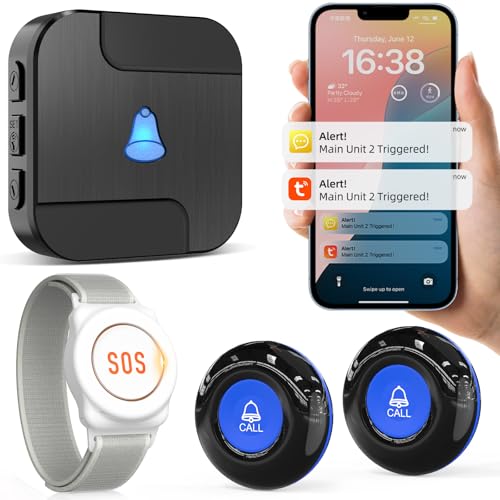
- Wi‑Fi app notifications for remote caregiver alerts
- 433MHz wireless button with 328 ft / 100 m range
- Custom ringtones, button names, and family sharing
Best For: Families who want app-based alerts and shared notifications for senior care at home.
Best Simple One-Button Alert – Caregiver Pager Wireless Call Button for Seniors
For shoppers comparing emergency call systems for elderly at home, this Caregiver Pager keeps things straightforward: one SOS button, one receiver, and instant alerts when help is needed. It is a practical choice for homes, small care setups, or anyone who wants an easy-to-use panic call option without a complicated installation.
Best For: Seniors, caregivers, and family members who want a simple wireless help button for home use.
Pros:
- One-button SOS call is easy for seniors or patients to use quickly
- 58 ringtones and 5 volume levels up to 120 dB help tailor alerts to the space
- IP55 water- and dust-resistant design adds durability for everyday use
- Includes an 18-month warranty for added peace of mind
Cons:
- Single-button, single-receiver setup may be too basic for larger homes
- Not a full monitoring system with app, fall detection, or caregiver network features
This is a solid pick if you want emergency call systems for elderly at home that prioritize simplicity, loud alerts, and reliable one-touch calling. It is best when fast access matters more than advanced smart-home features.
Best for Landline Users – Freedom Alert Landline Emergency Device
If you want a straightforward backup option, Freedom Alert is one of the more practical emergency call systems for elderly at home because it uses an existing landline and lets the user speak directly with family or 911 with the press of a button. It’s designed for at-home safety, especially when you want voice communication rather than a silent alarm.
Best For: Seniors who already have landline service and want a simple two-way emergency device with no monthly fees.
Pros:
- Two-way voice communication with family members or emergency responders
- No monthly monitoring fees
- Rechargeable unit with 24-hour battery backup
- Can be worn as a pendant or kept on its mount
Cons:
- Requires a landline phone service to work
- Less flexible than newer cellular or app-based systems
- Best suited to in-home use rather than broader coverage
For households that still rely on a landline, this is a dependable, no-subscription approach to emergency call systems for elderly at home. The big advantage is direct two-way calling, which can make it easier to explain what’s happening and get the right help faster.
Best Wi‑Fi App Alerts – Daytech Wi‑Fi Caregiver Call Button Set
If you want a home monitoring option that goes beyond a basic bedside alarm, this Daytech kit is a practical pick for emergency call systems for elderly at home. It combines a wearable SOS watch, two wireless call buttons, and a plugged-in receiver, plus app-based alerts so caregivers can respond even when they’re not in the same room.
Best For: Families who want Wi‑Fi app notifications, shared alerts, and flexible call-button placement for seniors, patients, or disabled adults at home.
Pros:
- Wi‑Fi app alerts let caregivers receive notifications on their phones in real time.
- Shared notifications can be sent to multiple family members.
- Custom ringtones and 5 volume levels help identify which button was pressed.
- Includes a wearable SOS watch plus two wireless call buttons for more placement options.
Cons:
- Receiver must stay plugged into an outlet.
- App-based features depend on Wi‑Fi and smartphone setup.
- Phone/text alerts may require an upgraded notification plan.
Overall, this is a useful fit for households that want layered alerts rather than a single alarm, especially if the goal is to modernize emergency call systems for elderly at home with app sharing and customizable notifications.
Best for Wi‑Fi Alerts – PILSAMAS WiFi Caregiver Pager Smart Call System
If you want emergency call systems for elderly at home with both local paging and app-based notifications, this PILSAMAS set stands out for flexible coverage and clear caller identification. It uses a Wi‑Fi hub plus 433MHz call buttons to help caregivers see who needs help and where, without a monthly fee for basic app alerts.
Best For: Families who want a simple at-home alert system with wearable and wall-mounted call options, plus smartphone notifications for added peace of mind.
Pros:
- Displays assigned caller ID on the hub, so you can quickly tell which room or person needs help.
- Wi‑Fi app alerts let family members receive notifications remotely, with free basic app control and no subscription.
- IP65 waterproof buttons and wristband make it suitable for bathrooms, showers, and other wet areas.
- Pre-paired setup and multiple placement options make it easy to adapt to bedrooms, clinics, or nursing care.
Cons:
- The hub requires 2.4GHz Wi‑Fi, so it won’t work on 5GHz-only networks.
- Remote SMS, call, and email features need an optional plan.
- The system is useful for alerts, but it is not a full medical monitoring service.
For buyers comparing emergency call systems for elderly at home, this model is a strong fit if you value fast identification, wet-area durability, and app notifications alongside simple in-home paging. It’s especially practical when the priority is making help requests obvious to both nearby caregivers and family members on their phones.
Best for Simple Care Alerts – Caregiver Pager Wireless Call Buttons
If you want practical emergency call systems for elderly at home without a complicated install, this caregiver pager is a straightforward option. It includes two call buttons and a portable pager, so seniors can trigger help quickly while caregivers move around the house or yard.
Best For: Families who need an easy-to-use alert system for seniors, patients, or loved ones living at home.
Pros:
- Includes 2 wireless call buttons plus 1 portable pager for flexible coverage
- Simple one-touch SOS operation is easy for seniors to understand
- Pager offers loud chime or continuous alarm modes for different situations
- Up to 500 feet range in open areas supports use across larger homes
Cons:
- Range can drop in real-world homes with walls and interference
- Basic alert system lacks advanced monitoring or smart-home features
Overall, this is a practical low-friction pick for emergency call systems for elderly at home when you mainly need fast alerts, simple setup, and reliable bedside or bathroom call access.
Best for App Alerts – CallToU Wi-Fi Caregiver Pager System
If you want emergency call systems for elderly at home with app-based alerts and family sharing, this CallToU pager is a practical pick. It pairs a wireless call button with a receiver and Tuya app notifications, so caregivers can be notified locally and remotely when help is needed.
Best For: Families who want a simple home alert system with phone notifications, shared access, and adjustable ringtones for different users.
Pros:
- App alerts plus optional paid text/phone notifications for broader coverage
- Family sharing in the Tuya app lets multiple caregivers receive the same alert
- 20 ringtones and 5 volume levels help tailor the system to the home
- Wireless setup with a claimed 328 ft range for typical house layouts
Cons:
- Supports 2.4GHz Wi-Fi only, not 5GHz
- Included package has just one call button and one receiver
- Some notification features require a monthly subscription
Overall, this is a solid fit for households comparing emergency call systems for elderly at home because it combines local alarms with smartphone alerts and shared monitoring. It makes the most sense when you want a flexible, app-connected solution rather than a basic standalone chime.
Best for Multi-Button Monitoring – Caregiver Pager with 6 Call Buttons
If you want one of the more flexible emergency call systems for elderly at home, this caregiver pager stands out for its six call buttons, portable receiver, and clear alert memory. It is built for situations where a caregiver needs to monitor multiple rooms or patients without missing repeated calls.
Best For: Caregivers, family members, or small care settings that need a portable alert system with multiple call points and easy call review.
Pros:
- Six call buttons make it easier to cover multiple rooms or care points.
- Pager display helps identify and clear calls instead of relying on a simple doorbell-style chime.
- Adjustable volume, vibration mode, and repeat alerts add flexibility for different environments.
- Portable receiver can be pocketed, clipped, hung, or carried on the go.
Cons:
- May be more system than a single-room setup needs.
- Not ideal if you want a very simple one-button alarm only.
Overall, this is a practical pick if you need emergency call systems for elderly at home that can handle multiple users or locations with more control than a basic buzzer. The call memory and clearable alerts make it especially useful in busy caregiving routines.
Best for Multi-Room Coverage – CallToU 3-Receiver Call Button System
For shoppers comparing emergency call systems for elderly at home, this CallToU pager stands out for covering more than one room at once. With three plug-in receivers and three waterproof call buttons, it gives caregivers and seniors a simple way to request help without needing a phone or complicated setup.
Best For: Homes that need multi-room coverage for an older adult, patient, or disabled family member, especially when one caregiver moves between rooms.
Pros:
- Comes with 3 receivers and 3 call buttons for broader home coverage
- 500+ ft open-area range helps extend alerts across bedrooms, kitchens, and common areas
- 55 ringtones and 5 volume levels make it easier to customize alerts
- Waterproof, dustproof buttons are useful in bathrooms and outdoor use
Cons:
- Receivers must stay plugged into outlets
- Range can be reduced by walls and other household obstacles
- Not a monitored medical alert service with emergency dispatch
This is a practical pick if you want a low-complexity option among emergency call systems for elderly at home, especially when the main goal is fast, audible alerts in multiple rooms. It is less about advanced features and more about dependable coverage and easy day-to-day use.
Best for Simple Wireless Alerts – Daytech Caregiver Pager
If you want emergency call systems for elderly at home that are easy to use and quick to install, the Daytech Caregiver Pager is a practical pick. It pairs a simple call button with a portable receiver, making it straightforward for seniors, disabled patients, and caregivers to stay connected without a complicated setup.
Best For: Households that want a basic, wireless help-button system for aging loved ones, especially when quick room-to-room alerts matter.
Pros:
- Easy one-press alerting with a portable receiver
- Up to 100 ft range for use around the home
- Simple setup with adjustable ringtones and volume
- Call button can be worn or wall-mounted near the bathroom
Cons:
- Not a full monitored medical alert service
- Watch and button are not fully waterproof
- Best suited to home use rather than large properties
For families comparing emergency call systems for elderly at home, this Daytech option stands out for its simplicity, portability, and low-friction day-to-day use. It’s a solid fit when the goal is fast in-home assistance without adding unnecessary complexity.
Best Simple Pick – CallToU Wi-Fi Caregiver Pager with App Alerts
If you want one of the more connected emergency call systems for elderly at home, this CallToU setup combines a wireless call button with app-based alerts so caregivers can be notified even when they’re away. It’s a practical pick for homes that want simple push-button help plus phone notifications and shared family access.
Best For: Families who want Wi‑Fi-connected help alerts with app notifications and the option to share alerts across multiple caregivers.
Pros:
- App notifications let caregivers receive help alerts on their phones
- 433MHz wireless range helps the button work through walls and doors
- Custom ringtones and button names make it easier to identify who needs help
- Sharing through the Tuya app can alert multiple family members
Cons:
- Only supports 2.4G Wi‑Fi, not 5G
- Phone or text message alerts require a paid subscription
For households comparing emergency call systems for elderly at home, this model stands out for remote notification flexibility rather than just an in-room alarm. It’s a strong fit if you want caregivers to stay informed beyond the walls of the house.
How We Picked the Best Emergency Call Systems for Elderly at Home
We prioritized systems that are easy to set up, simple for older adults to use, and suitable for real home care needs. That means clear alert methods, dependable wireless performance, and enough flexibility for bedrooms, bathrooms, living areas, and caregiver stations. We also looked for options with useful features like multiple call buttons, app alerts, two-way communication, and low-maintenance operation.
Quick Comparison
Basic wireless pager systems are best for straightforward in-home alerts and fast response. App-connected Wi-Fi models are better if you want notifications beyond the home or more visibility on a smartphone. Two-way call systems suit users who may need a voice connection, while multi-button kits are ideal for larger homes or households with several care locations.
Key Buying Factors for Emergency Call Systems for Elderly at Home
Ease of Use
Look for large buttons, clear labels, and minimal setup steps. In an emergency, the device should be usable without confusion, charging delays, or complicated menus.
Alert Type
Decide whether you need a local receiver, a loud chime, a phone app notification, or two-way calling. The right alert style depends on whether a caregiver is nearby, in another room, or off-site.
Range and Coverage
Check wireless range carefully, especially in larger homes or homes with thick walls. For multi-room coverage, extra receivers or additional call buttons can make a big difference.
Power and Reliability
Battery life, backup power, and Wi-Fi dependence all matter. A system should remain dependable during routine use and not create extra maintenance work.
Durability and Placement
Water-resistant buttons are useful for bathrooms and bedside placement. Wearable buttons or wristbands can help when mobility is limited or falls are a concern.
Who Should Buy Which Emergency Call Systems for Elderly at Home?
If you want the simplest setup, choose a basic wireless pager with one or more buttons and a receiver. If you need remote alerts for family members, a Wi-Fi app-based system is the smarter fit. If the senior lives alone or may need to speak during an incident, choose a model with two-way calling. For households managing multiple rooms, caregivers, or patients, a multi-button system offers the most flexibility.
The best Emergency Call Systems for Elderly at Home are the ones that match the user’s daily routine, caregiver availability, and response needs. Focus on comfort, clarity, and dependable alerts over features that won’t actually get used.