The Nomo Smart Care Medical Alert System review is all about simple, private in-home protection for seniors.
It combines fall detection, emergency alerts, and caregiver notifications without cameras or a landline.
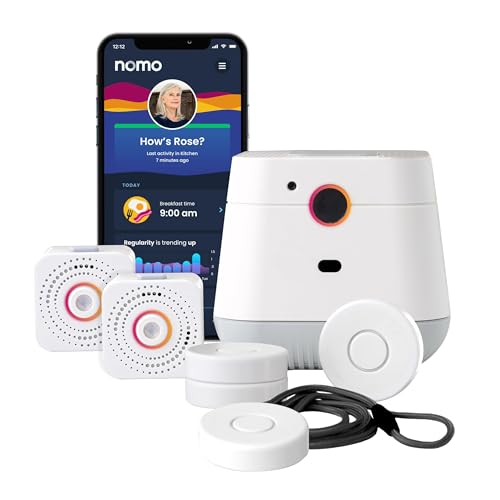
Nomo Smart Care Review Summary
Nomo Smart Care Medical Alert System is best for seniors who want a camera-free, WiFi-connected safety setup that is easy to install and easy for family members to monitor. If you are trying to balance independence, privacy, and real emergency support, this system makes a strong case because it brings together fall detection, a panic-button option, two-way voice communication, and app-based caregiver alerts in one package.
From a buyer’s perspective, the appeal is clear: this is not just a basic pendant alarm.
It is a more complete in-home medical alert system built around a Smart Hub, two Satellites, and Tags that can be worn or placed on important items.
That design gives it more flexibility than a single-button wearable, especially for households that want continuous in-home awareness rather than only one emergency trigger.
The biggest value driver is the setup experience.
Nomo Smart Care uses a wireless, plug-and-play design with no technician visit and no special wiring required.
That makes it especially attractive for adult children helping a parent age in place, or for seniors who do not want a complicated installation process.
The included 60-day monitoring trial also lowers the barrier to trying the system before committing to ongoing service.
Scorecard
Nomo Smart Care Medical Alert System Scorecard
| Category | Score | Why It Matters |
|---|---|---|
| Fall Detection | 9.0/10 | Automatic fall alerts and adjustable sensitivity make this the core strength of the system. |
| Emergency Response | 8.0/10 | Alerts through the Nomo app, caregiver notifications, and RapidSOS-backed monitoring during the trial improve response speed. |
| Setup Simplicity | 9.0/10 | Wireless DIY installation keeps setup easy and avoids technician appointments. |
| Privacy and Monitoring Design | 8.0/10 | Camera-free monitoring is a major plus for buyers who value discretion. |
| Communication Features | 8.0/10 | Two-way voice communication through the hub adds reassurance in an emergency. |
| App Control and Notifications | 8.0/10 | Trusted Care Circle notifications and sensitivity controls make it flexible for families. |
| Long-Term Value | 7.0/10 | The trial is useful, but the monthly subscription matters for long-term ownership. |
Bottom line: if you want a privacy-first medical alert system for seniors with strong fall detection and straightforward setup, Nomo Smart Care is a compelling option.
If you want something that works everywhere outside the home, or you do not want any subscription at all, you should keep reading the drawbacks carefully.
Key Features and Specifications of Nomo Smart Care
The Nomo Smart Care Medical Alert System is designed as a complete in-home safety package rather than a single device.
The kit centers on a Smart Hub, two motion-and-sound sensing Satellites, and Tags that can be used as wearable panic buttons or placed on important items.
| Specification | Details |
|---|---|
| Brand | Nomo Smart Care |
| Model Number | KIT1001R-01 |
| Color | White |
| Power Source | AC power with battery backup |
| Connectivity Technology | Wireless |
| Compatible Devices | Smartphone, Tablet |
| Alert Type | Fall |
| Control Method | App |
| Smart Home Compatibility | Smart Home Compatible |
| Item Dimensions | 10.6 x 4.75 x 7.1 inches |
| Item Weight | 1.24 kilograms |
| Installation Method | Wireless DIY |
| Unit Count | 1 count |
| Built-In Media | Batteries |
- Complete in-home monitoring safety system
- Smart Hub included
- Two motion and sound sensing Satellites included
- Tags can function as wearable panic buttons
- Fall detection and emergency alerts
- 24/7 protection over secure WiFi
- No landline required
- Camera-free privacy-focused design
- Plug-and-play installation
- No special wiring required
- No technician visits required
- Two-way voice communication through the Hub
- 60-day trial of 24/7 monitoring
- RapidSOS integration through the Nomo app during the trial
- Monthly subscription required after the trial
- Trusted Care Circle caregiver notifications
- Adjustable tag alert sensitivity in the app
- Supports seniors aging in place
- Compatible with smartphone and tablet via app
- AC power with battery backup
These specs matter because they tell you how the system behaves in the real world.
A battery backup helps during power interruptions, wireless installation reduces hassle, and the app-based control model means the system is designed for households that are comfortable using a phone or tablet.
Pros and Cons of Nomo Smart Care
Understanding the Nomo Smart Care Medical Alert System pros and cons is essential before you buy.
This product has some genuine strengths, but it also has limitations that are important for long-term ownership.
| Pros | Cons |
|---|---|
| Easy wireless DIY setup | Requires home WiFi to work properly |
| Fall detection plus emergency alerts | Monthly subscription continues after the trial |
| Camera-free for better privacy | Designed mainly for in-home use |
| Two-way voice communication | Best value depends on long-term monitoring needs |
| Caregiver notifications through the app | Placement of hub, satellites, and tags can affect performance |
| Adjustable alert sensitivity | Requires smartphone or tablet access for full feature use |
| Includes monitoring trial | |
| Battery backup adds resilience during outages |
What stands out most is how complete the package feels.
Rather than relying on a single wearable button, Nomo Smart Care adds environmental sensing through Satellites and app-based caregiver communication.
That is a smarter design choice for buyers who want more than a basic emergency pendant.
What holds it back is the subscription model.
If you only want a one-time purchase with no recurring fee, this system is not the best fit.
The ongoing monitoring costs are easier to justify if you actively want caregiver alerts, 24/7 monitoring, and the added reassurance of response support.
How the Hub, Satellites, and Tags Work Together
The system’s design is the reason it feels more advanced than a traditional medical alert device.
The Smart Hub acts as the communication center, the Satellites listen for motion and sound activity, and the Tags provide flexible emergency access.
In practical terms, this means the system can sense activity across the home rather than relying only on a button press.
The Tags are particularly useful because they can be worn as a panic button or placed on items that matter, giving the user more ways to trigger an alert.
The hub’s two-way voice feature is another thoughtful inclusion.
In an emergency, being able to communicate through the hub can reduce panic and help caregivers or monitoring services confirm what is happening.
That is a meaningful advantage over simpler devices that only send a signal and stop there.
For buyers, the real question is whether this layered setup matches your home.
If you want a single portable device that works on the go, this is not that product.
If you want more complete in-home coverage, the hub-plus-satellite approach makes a lot of sense.
Fall Detection and Alert Sensitivity Settings
Fall detection is the headline feature here, and it is the main reason many families will consider the Nomo Smart Care Medical Alert System review seriously.
Falls are one of the biggest risks for older adults living alone, and a system that can identify trouble quickly may reduce the time it takes to get help.
The review data points to one especially useful detail: adjustable sensitivity.
That matters because not every home or user behaves the same way.
A highly sensitive setting may catch more incidents, but it can also increase false alarms.
Lowering sensitivity may reduce nuisance alerts, but it can also make the system less responsive.
This is where buyer judgment matters.
For seniors who move carefully and want maximum protection, a more sensitive configuration may be ideal.
For users with lots of normal movement, pets, or frequent chair transfers, a tuned setup may be more practical.
The ability to adjust sensitivity is a thoughtful design choice, but it also means the system performs best when installed and configured with care.
Buyer tip: after setup, test alert behavior in the real home environment and confirm that the detection zones and tag placement feel natural.
Small adjustments can have a big impact on confidence and reliability.
What the 60-Day Monitoring Trial Includes
One of the more appealing parts of this system is the 60-day trial of 24/7 monitoring.
That trial gives buyers a real chance to evaluate the service before committing to monthly payments.
During the trial, the Nomo app supports emergency alerting and includes RapidSOS integration, which is a strong signal that the system is built with faster response workflows in mind.
It also supports caregiver notifications through the Trusted Care Circle, so family members can stay informed when something happens.
This trial period is a smart buying feature because it lowers risk.
You can install the system, test the app, learn the workflows, and decide whether the subscription is worth continuing.
That is a better approach than being locked into a service before you know how well it fits your household.
Still, the trial does not remove the need to think about the long term.
If you know you want monitoring after the trial ends, the subscription becomes part of the overall ownership cost.
If you are only casually interested in emergency support, the recurring fee may be harder to justify.
Privacy, WiFi Requirements, and Home Compatibility
Privacy is one of the most attractive features of this product.
The system is camera-free, which is a big plus for seniors who want monitoring without feeling watched.
The tradeoff is that it depends on secure home WiFi.
That is not unusual for modern smart home safety gear, but it does mean you should not buy this system if your internet connection is weak, inconsistent, or unavailable.
Because the alerting and app functions rely on network connectivity, stable WiFi is part of the product’s core usefulness.
It is also important to understand that this is designed primarily for in-home coverage.
If you want protection in the yard, on errands, or while traveling, a cellular wearable medical alert service may be a better fit.
Nomo Smart Care is strongest when the user spends most of the time inside the home and wants a more connected monitoring experience there.
Before buying, confirm that your home layout is suitable for the hub and satellite placement.
Room spacing, obstacles, and where the user spends most of their time can influence alert performance.
That is normal for this category, but it is worth planning carefully.
Who Should Buy Nomo Smart Care?
Nomo Smart Care Medical Alert System is a smart buy for seniors aging in place who want privacy, fall detection, and easy emergency access in one system. It is also a strong match for adult children and caregivers who want app-based notifications and a more hands-on way to stay informed without installing cameras.
- Buy it if you want a camera-free senior alert system that feels private and discreet.
- Buy it if you want easy DIY installation with no technician visit and no special wiring.
- Buy it if fall detection is your top priority and you want a system built around that use case.
- Buy it if you want two-way voice communication and caregiver alerts in one package.
- Buy it if you are comfortable with WiFi and app-based control for monitoring and configuration.
Who should skip it?
Buyers who need a portable solution outside the home, people who do not want any subscription at all, and households without reliable WiFi should probably consider a different product type.
Traditional pendant-style systems or cellular emergency buttons may be a better fit in those cases.
Alternatives to Consider Before You Buy
If you are comparing the Nomo Smart Care Medical Alert System against other options, the right alternative depends on what matters most.
- Medical Guardian medical alert system — A widely recognized option if you want a more traditional monitoring service with different device styles.
- Bay Alarm Medical alert system — Worth considering if you want a well-known senior alert brand with established service options.
- Lifeline medical alert system — A familiar choice for buyers who prefer a classic emergency response setup.
- Wearable fall detection device — Useful if you only need a compact button and do not want a multi-component home system.
- camera-free home monitoring for seniors — Good if privacy is your main priority and you want to compare different in-home monitoring approaches.
Compared with these options, Nomo Smart Care stands out for its privacy-first design, satellite-based monitoring, and app-controlled caregiver notifications.
Traditional medical alert systems may be simpler, but they often offer less environmental coverage.
Camera-based systems may provide visual context, but many buyers will prefer the discretion of Nomo’s design.
Is Nomo Smart Care Worth It?
Yes, Nomo Smart Care Medical Alert System is worth it for the right buyer. If you want a modern, camera-free, in-home alert system with fall detection, two-way communication, caregiver notifications, and an easy setup process, it delivers a thoughtful feature set that feels genuinely useful rather than gimmicky.
The main reasons to choose it are the same reasons it may not fit everyone.
It works best in homes with stable WiFi, it is designed primarily for indoor use, and the service model includes a subscription after the trial.
Those are fair tradeoffs if your priority is reliable in-home peace of mind and a more connected caregiving setup.
My verdict: Nomo Smart Care is a strong buy for seniors aging in place and families who want a privacy-focused medical alert system with modern monitoring features. It is not the cheapest or simplest one-time purchase option, but it is one of the more practical choices if you want fall detection, app alerts, and discreet home coverage in a single package.
If that sounds like your situation, the system makes a lot of sense.
If you need portability beyond the home or hate subscriptions, keep looking at traditional or cellular alternatives instead.