Choosing the right camera for caregiving is about more than video quality. You want clear images, dependable alerts, simple controls, and features that make it easier to check in without being intrusive.
This roundup of home monitoring cameras for remote caregiving focuses on practical options for seniors, babies, pets, and general home supervision, with an emphasis on everyday ease of use.
Best 10 Home Monitoring Cameras for Remote Caregiving Picks for 2026
4K AI-Powered Indoor Monitor

- 4K video with 360° pan-and-tilt coverage
- AI tracking and cry/audio detection
- Local storage with no required subscription
Best For: Caregivers who want clear indoor monitoring with smart alerts and no monthly fee
Easy Call Camera
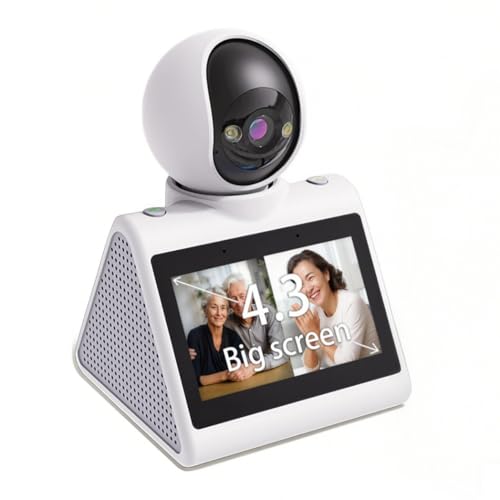
- 4.3-inch display with two-way video calling
- One-button call design for easy use
- 1080p video with motion detection and night vision
Best For: Families needing a simple camera for elderly check-ins and easy video calls
Dual-Lens 4K Care Camera
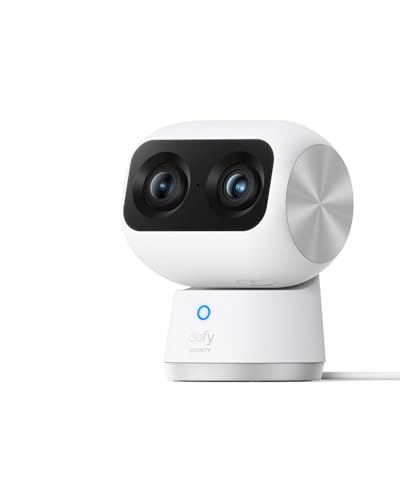
- Dual cameras with 8× hybrid zoom
- 4K wide view plus AI auto-tracking
- Detects humans, pets, crying, and audio
Best For: Caregivers who want zoomed-in detail and full-room coverage in one camera
Simple Indoor Check-In Camera

- 1080p HD with 130° wide-angle view
- Motion detection and night vision
- Two-way audio with smartphone control
Best For: Caregivers who want a simple app-based indoor camera for basic monitoring
Easy-View Indoor Monitor
aosu 2K Pan/Tilt Family Camera

- 360° pan and 155° tilt cover more of the room
- One-touch calls and two-way audio support fast check-ins
- IR night vision and 24/7 recording help day and night
Best For: Families wanting simple indoor monitoring with easy voice contact
Video-Call Care Camera
TMEZON 2-Pack Grandparent Monitor

- Two-way video/audio and one-button calling simplify communication
- 1080P video and night vision support everyday monitoring
- 360° wide view helps reduce blind spots
Best For: Caregiving situations centered on easy video calls with older adults
Room-Wide Care Watch

- 2K video and pan/tilt coverage help watch larger rooms
- Motion, person, and baby crying detection add useful alerts
- Local microSD or cloud storage options support recording
Best For: Families needing wide-view indoor monitoring with flexible storage
Budget-Friendly Pan/Tilt Monitoring
Kasa 1080p Indoor Pan/Tilt Wired Security Camera

- 1080p live view with pan/tilt control
- Motion and sound alerts with two-way audio
- Local MicroSD recording with no monthly fees
Best For: Caregivers who want affordable indoor coverage without subscription costs
Wide-Coverage Multi-Camera Pick
GNCC 2K Security Cameras 4-Pack

- 2K indoor video with clear night vision
- 355° pan/tilt for broad room coverage
- Four cameras for monitoring multiple spaces
Best For: Caregivers who need broad, multi-room indoor coverage
Compact Cry-Detection Monitor
Tapo 1080p Pan/Tilt Security Camera

- 360° pan/tilt with 1080p video
- Motion, person, and baby-cry detection
- Local or cloud storage options
Best For: Caregivers who want one-room monitoring with cry alerts and flexible storage
4K AI-Powered Indoor Monitor – eufy Security E30
If you need home monitoring cameras for remote caregiving, the eufy Security 4K Indoor Camera E30 focuses on clear detail, flexible viewing, and fewer ongoing costs. Its 4K video, pan-and-tilt coverage, AI tracking, and color night vision make it a strong fit for checking in on family, pets, or a child without paying a subscription.
Best For: Caregivers who want a subscription-free indoor camera with wide coverage and smart tracking.
Pros:
- 4K UHD recording with 360° pan-and-tilt coverage
- AI detection can distinguish humans, pets, audio cues, and crying sounds
- Two-way audio supports real-time communication
- Local SD card storage with no monthly fee required for core functions
Cons:
- HomeKit support is limited to up to 1080p resolution
- SD card is sold separately
- Optional cloud and premium features may require a subscription
The E30 is a practical pick if you want a versatile indoor monitor that can follow movement and show more of the room without constant manual adjustments. For remote caregiving, its mix of AI alerts, night vision, and two-way audio covers the basics well while keeping ownership costs low.
Easy Call Camera – 4.3" Screen Monitor
For home monitoring cameras for remote caregiving, this model stands out because it is built around simple video calling, not just passive watching. The 4.3-inch screen, one-button call function, motion detection, and local SD card storage make it appealing for keeping in touch with elderly family members, children, or pets.
Best For: Families who want a simple, screen-based camera for easy two-way video calling.
Pros:
- 4.3-inch screen supports two-way video calling
- One-button call design is easier for elderly users and children
- 1080p video with motion detection and night vision
- Local SD card storage supports on-device recording
Cons:
- Only supports 2.4G Wi-Fi
- SD card is not included
- Product notes do not list advanced AI detection features
This is a good choice if the goal is quick communication and straightforward monitoring rather than advanced smart-camera automation. The physical call button and built-in display can make daily check-ins easier for seniors or anyone who is less comfortable using a smartphone.
Dual-Lens 4K Care Camera – eufy S350
If you are comparing home monitoring cameras for remote caregiving, the eufy Security 4K Indoor Cam S350 is built for cases where both wide-room context and close-up detail matter. Its dual-camera design, 8× hybrid zoom, AI auto-tracking, and cry/human/pet detection make it well suited to watching over an older adult, baby, or pet.
Best For: Caregivers who need a detailed indoor camera with zoom, tracking, and smart alerts.
Pros:
- Dual-camera system combines a wide view with 8× hybrid zoom
- 4K UHD clarity helps you inspect details across the room
- AI tracking and preset zoom spots support frequent caregiving checks
- Human, pet, crying, and audio detection improve alert relevance
Cons:
- HomeKit is not supported
- Not compatible with HomeBase 2
- SD card is not included for local recording
The S350 is the strongest fit here if you want one camera that can both monitor a full room and zoom in when something needs a closer look. For remote caregiving, that flexibility can be especially helpful when checking medications, a crib, or a pet bed.
Simple Indoor Check-In Camera – Chamberlain myQ
The Chamberlain myQ Smart Indoor Security Camera is a straightforward option for home monitoring cameras for remote caregiving when you mainly want reliable basics. It offers 1080p HD video, a 130° wide-angle view, motion detection, night vision, and two-way audio, plus smartphone control for quick check-ins from anywhere.
Best For: Caregivers who want a basic indoor camera with app alerts and two-way talk.
Pros:
- 1080p HD video with a 130° wide-angle lens
- Night vision helps with after-hours monitoring
- Two-way audio supports communication from the app
- Motion detection can send real-time notifications
Cons:
- Premium features require a subscription
- Alert type is motion only
- Resolution is lower than 4K alternatives
This camera makes sense if you want a simple, familiar indoor monitor without extra complexity. It covers the essentials well, but shoppers who want richer caregiving features or local storage-focused operation may prefer the more specialized options above.
Easy-View Indoor Monitor – aosu 2K Pan/Tilt Family Camera
If you want home monitoring cameras for remote caregiving, this aosu indoor model is built for quick check-ins and room-wide coverage. The 2K view, 360° horizontal rotation, and 155° vertical tilt help you see more of a living room, bedroom, or nursery without moving the unit. One-touch calling and two-way audio also make it easier for an older adult or child to reach you fast.
Best For: Remote caregiving setups that need simple two-way communication and broad indoor visibility.
Pros:
- 360° pan and 155° tilt provide broad indoor coverage.
- One-touch calls and two-way audio support quick communication.
- Smart motion tracking follows movement automatically.
- IR night vision and 24/7 recording help with around-the-clock monitoring.
Cons:
- Works only with 2.4GHz Wi-Fi.
- Designed for indoor use only.
This is a practical option if you want a caregiving camera that combines easy calling with flexible room coverage. It is especially useful when you want to check in visually and respond without relying on a separate phone call.
Video-Call Care Camera – TMEZON 2-Pack Grandparent Monitor
For shoppers comparing home monitoring cameras for remote caregiving, this TMEZON two-pack stands out because it is designed around video calling. The built-in 2.8-inch display and one-button calling make it easier for grandparents, kids, or anyone less comfortable with smartphones to start a call. With 1080P video, 360° wide viewing, and night vision, it can also serve as a straightforward indoor monitoring setup.
Best For: Remote caregiving where two-way video calls matter most, especially for grandparents or young children.
Pros:
- Two-way video/audio and one-button calling make contact simple.
- 1080P live video gives a clear view of the home.
- 360° wide view and motion sensing help cover blind spots.
- Night vision supports monitoring after dark.
Cons:
- Only supports 2.4G Wi-Fi.
- Motion alerts are motion-only, so it is less feature-rich than some smart monitors.
- Indoor use only.
This is a strong pick if the main goal is easy, face-to-face communication rather than advanced smart-home features. The two-camera pack may also make sense if you want to monitor more than one room or split coverage between family spaces.
Room-Wide Care Watch – Tapo 2K Pan/Tilt 2-Pack
Among home monitoring cameras for remote caregiving, the Tapo C211 2-pack is a flexible choice if you want room-wide coverage and dependable alerts. Its 2K video, 360° horizontal pan, and 114° vertical tilt make it easier to follow activity in a nursery, living room, or hallway. It also adds motion, person, and baby crying detection, which can be useful when you want more context than basic motion alerts.
Best For: Remote caregiving that needs wide indoor coverage, clear alerts, and optional local or cloud storage.
Pros:
- 2K resolution helps capture small details clearly.
- 360° horizontal and 114° vertical movement expands room coverage.
- Motion, person, and baby crying detection improve alert relevance.
- Local microSD storage or Tapo Care cloud storage adds recording options.
Cons:
- Uses 2.4GHz Wi-Fi only.
- MicroSD card is not included.
- Designed for indoor use only.
This model is a sensible fit if you want dependable monitoring with more advanced alerting than a basic indoor camera. The two-pack also gives you more flexibility if you are covering multiple caregiving spaces.
Budget-Friendly Pan/Tilt Monitoring – Kasa 1080p Indoor Pan/Tilt Wired Security Camera
If you want home monitoring cameras for remote caregiving without paying a monthly fee, this Kasa indoor pan/tilt camera is a practical fit. It offers 1080p live viewing, motion and sound alerts, and local MicroSD storage, so you can check in on a room, track movement, and review clips from the app.
Best For: Caregivers who want an affordable indoor camera with pan/tilt coverage and subscription-free recording.
Pros:
- 1080p Full HD live stream with 120-degree viewing and pan/tilt control
- Motion and sound detection with smartphone alerts, including night alerts
- Local MicroSD storage up to 256 GB with no monthly fees
- Two-way audio and smart home compatibility with Alexa and Google Assistant
Cons:
- Requires 2.4 GHz Wi-Fi and corded power
- Local storage card is sold separately
- Best suited to indoor use only
Overall, this model stands out if you want a straightforward caregiving camera for routine room checks, especially when subscription-free recording matters more than advanced video resolution.
Wide-Coverage Multi-Camera Pick – GNCC 2K Security Cameras 4-Pack
For home monitoring cameras for remote caregiving across multiple rooms, this GNCC 4-pack gives you broad coverage with 2K video, 355-degree pan/tilt, and instant motion alerts. The set is designed for continuous indoor monitoring, making it useful when you need to keep an eye on several spaces at once from the app.
Best For: Caregivers who need to monitor several indoor rooms or areas at the same time.
Pros:
- 2K FHD video with clear night vision for day and night monitoring
- 355-degree horizontal and 90-degree vertical rotation for wide room coverage
- Two-way audio for real-time conversations through the app
- SD card or cloud storage options, plus support for continuous 24/7 recording on SD card
Cons:
- Requires wired power for continuous operation
- SD card is not included
- Set-up and app use may be more involved because it is a 4-camera bundle
This is the strongest option when room-by-room oversight matters more than a single-camera solution, especially if you want app-based access and wide-angle motion tracking in multiple spaces.
Compact Cry-Detection Monitor – Tapo 1080p Pan/Tilt Security Camera
This Tapo camera is a solid choice for home monitoring cameras for remote caregiving when you want room coverage, baby-cry detection, and simple app alerts in one indoor unit. Its pan/tilt range, 1080p video, and local or cloud storage options make it easy to monitor a bedroom, hallway, or living space remotely.
Best For: Caregivers who want a compact indoor camera with cry detection and flexible storage.
Pros:
- 360-degree horizontal and 114-degree vertical pan/tilt coverage
- Motion, person, and baby-cry detection with instant notifications
- 1080p Full HD video plus 30-foot night vision
- Local microSD support up to 512 GB or optional Tapo Care cloud storage
Cons:
- Designed for indoor use only
- Uses 2.4 GHz Wi-Fi only
- microSD card is not included
If your caregiving needs center on one room or a main living area, this camera balances useful detection features with flexible storage and dependable pan/tilt coverage.
How We Picked the Best Home Monitoring Cameras for Remote Caregiving
We focused on cameras that are useful for remote caregiving in real homes: reliable motion alerts, two-way audio, night vision, app access, and flexible viewing angles. We also favored models with straightforward setup, local or cloud storage choices, and features that reduce false alarms.
Quick Comparison
In a fast comparison, the main differences come down to resolution, coverage, and communication tools. Higher-resolution options help when you need to zoom in on details, while pan-and-tilt or 360-degree models are better for tracking movement across a room. Screens and one-touch calling can be especially helpful for seniors who may not use a smartphone comfortably.
Key Buying Factors for Home Monitoring Cameras for Remote Caregiving
Video Quality and Coverage
Look for at least 1080p, and consider 2K or 4K if you want better detail at a distance or plan to use digital zoom. Pan-and-tilt functionality is valuable in bedrooms, living rooms, and nurseries because it lets you follow movement without needing multiple cameras.
Communication and Interaction
Two-way audio is essential for reassurance, reminders, and quick check-ins. For caregiving setups, features like video calling, one-touch calls, or a built-in display can make contact easier for older adults or anyone who prefers a simpler interface.
Alerts and Tracking
Smart motion detection and motion tracking help the camera follow activity and reduce missed moments. If the camera will monitor a busy room, choose a model with adjustable sensitivity so you can limit unnecessary notifications.
Storage, Privacy, and Connectivity
Decide whether you want cloud storage, local SD card support, or both. If privacy matters most, local recording may be preferable. Also check Wi-Fi compatibility before buying; some cameras work only on 2.4GHz, while others support both 2.4GHz and 5GHz networks.
Who Should Buy Which Home Monitoring Cameras for Remote Caregiving?
If you want the clearest image and broadest view, choose a higher-resolution pan-and-tilt camera. If your priority is easy communication with an older parent or grandparent, a camera with a screen or simplified calling features may be the best fit. For larger homes or multi-room coverage, a multi-pack can be more cost-effective. If you are building a flexible monitoring setup, the best Home Monitoring Cameras for Remote Caregiving are the ones that match the room layout, the user’s comfort with technology, and the level of attention you need day to day.