If you are comparing a mobile workstation for clinical spaces, this Mount-It!
Height Adjustable Medical Laptop Cart review focuses on the details that matter: adjustability, security, mobility, and organization.
It looks like a purpose-built fit for busy care environments rather than a generic office cart.
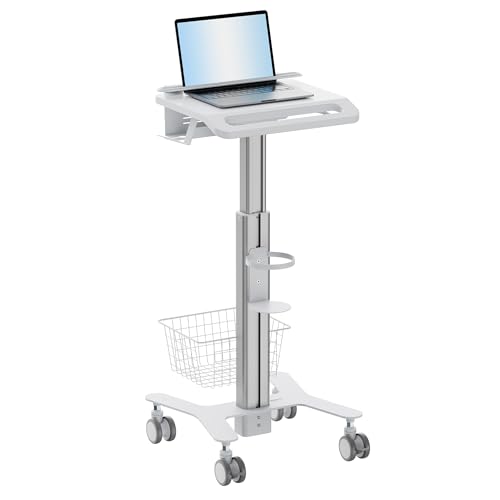
Mount-It! Laptop Cart Review Summary
The Mount-It!
Height Adjustable Medical Laptop Cart makes the most sense for clinics, hospitals, reception areas, telehealth rooms, and any setting where a shared laptop station needs to move cleanly from one task to another.
Its strongest appeal is that it combines sit-or-stand flexibility with a locking laptop holder, practical storage, and rolling mobility in one unit.
That combination is the main reason to buy it.
For buyers who need a mobile clinical workstation instead of a standard desk stand, this is a focused solution.
It is especially relevant if staff rotate between bedside documentation, check-in work, and short seated sessions, because the cart is designed around those mixed workflows.
Review Scorecard
| Category | Score | Buyer-focused rationale |
|---|---|---|
| Height flexibility | 9/10 | Adjusts from 31.5″ to 47.2″, which covers both seated tasks and standing use. |
| Laptop security | 9/10 | The locking security bar adds a clear anti-theft advantage for shared or unattended spaces. |
| Workflow organization | 8/10 | Built-in holders for scanners, wipes, and small tools keep essentials close at hand. |
| Mobility | 8/10 | Front-locking swivel casters support easy movement and secure placement when parked. |
| Clinical fit | 9/10 | The listing is clearly aimed at clinics and hospitals, not general home-office use. |
| Versatility | 8/10 | Works across bedside documentation, telehealth, and reception check-ins. |
| Simplicity | 7/10 | Purpose-built design is a strength, but it is less universal than a plain cart or desk stand. |
Key Features and Specifications of Mount-It! Laptop Cart
The clearest specification is the height range.
The cart transitions between 31.5 inches and 47.2 inches, which gives it a useful range for shared workstations and rotating shifts.
That matters because a cart in this category is usually judged less by style and more by whether it can adapt to the way different staff members work.
The laptop holder is designed for security as well as support.
Mount-It! says the locking bar can hold laptops up to 17 inches, which should cover many common clinical and administrative machines.
For shared environments, the anti-theft angle is one of the most compelling features in the listing.
Organization is another part of the design.
The product includes dedicated holders for scanners, wipes, and small tools.
That sounds modest, but in practice it is one of the things that separates a clinical cart from a basic rolling stand.
A workstation that keeps accessories within reach can reduce the stop-start friction that slows down documentation-heavy work.
Mobility is handled by front-locking swivel wheels.
The listing emphasizes smooth rolling through exam rooms and hallways, then locking once the cart is in place.
That is exactly what a mobile workstation should do in a care setting: move easily when needed, but stay planted during actual use.
The broader positioning is also important.
This is not presented as a general-purpose laptop desk for apartments or gaming setups.
It is a medical and office workflow cart built for bedside documentation, telehealth consults, and reception check-ins.
If your use case is outside those environments, some of the value here may be wasted.
Pros and Cons of Mount-It! Laptop Cart
Pros
- Adjustable for real shift work. The 31.5″ to 47.2″ range gives the cart enough flexibility for different users and different postures.
- Security is built in. The locking bar is a strong advantage when equipment is shared in busy spaces.
- Useful clinical organization. Scanner, wipe, and tool holders help keep the workspace uncluttered.
- Mobile but lockable. Rolling casters make movement easy, and locks help the cart stay put when needed.
- Clear use-case focus. The cart is purpose-built for clinics, hospitals, and similar workflows.
Cons
- Specialized rather than universal. Buyers who just need a simple home-office laptop stand may be paying for features they will not use.
- Laptop size ceiling matters. The support is listed for laptops up to 17 inches, so larger devices are out.
- No lightweight minimalism angle. This is a workstation tool, so people wanting a compact or decorative piece will likely want something else.
The main tradeoff is simple: this cart is better if you need a secure, movable clinical station than if you want a basic laptop perch.
Its strengths are practical, not aesthetic.
Who Should Buy Mount-It! Laptop Cart?
This product is a strong fit for clinics that need a shared documentation cart, hospitals that move equipment between rooms, and front-desk or intake teams that want a laptop station they can roll and lock in place.
It also makes sense for telehealth setups where the workstation needs to shift between rooms or task types during the day.
It should also appeal to buyers who care about physical security.
If a laptop is left in public or semi-public areas, the locking bar becomes more than a convenience feature.
It is part of the value proposition.
It is less compelling for anyone who wants a general home-office desk, a stylish studio accessory, or a light-duty stand used in one fixed place.
If you do not need mobility, storage hooks, or the locking design, the cart is probably more specialized than necessary.
In short, **buy it if you need a rolling clinical workstation with security and posture flexibility.
Skip it if you just need a laptop stand.**
How Mount-It! Laptop Cart Fits Clinical Workflows
Bedside Documentation
The most convincing use case is bedside documentation.
The cart is designed to move through hallways and exam rooms, then stop securely where staff need it.
That makes it a practical fit for workflows where the laptop travels with the clinician instead of staying on a desk.
Telehealth and Shared Stations
For telehealth consults and shared stations, the adjustable height is the headline feature.
Different users can work from the same cart without forcing a single fixed posture.
The storage hooks and accessory holders also help keep a shared setup from turning into a cluttered catch-all.
Reception and Intake
Reception and check-in teams can benefit from the mobility and organization as well.
The cart is not just for back-office use; the listing specifically points to reception check-ins, which suggests it is meant to handle front-line administrative work as well as clinical documentation.
Security and Parking
The locking bar and locking wheels matter most when the cart is parked.
In busy environments, equipment often gets left for a moment between tasks.
A cart that supports the laptop securely and then stays in place is more useful than one that only rolls well.
Alternatives to Mount-It! Laptop Cart
If you want to compare similar options on Amazon, it helps to look at other mobile workstation lines with different priorities:
These alternatives are worth checking if you want a different balance of adjustability, footprint, or cart style.
Some buyers may prefer a more office-oriented cart, while others may want a stronger clinical focus or a simpler rolling stand.
Is Mount-It! Laptop Cart Worth It?
Yes, if your job depends on a secure, height-adjustable, rolling workstation that fits clinical or shared-service workflows.
The Mount-It!
Height Adjustable Medical Laptop Cart is worth considering because it solves a specific problem well: moving a laptop station between tasks without losing stability, organization, or security.
It is most worthwhile for clinics, hospitals, and front-line teams that need one cart to do several jobs.
It is less worthwhile if your use case is casual, decorative, or stationary.
For the intended buyer, though, the design choices are sensible and the feature set is coherent, which is what should matter here.